| Introduction of Illustrator |
| |
| Getting started |
| |
| Illustrator can be used to create professional graphic images or to edit graphic images created in other programs, such as Photoshop. To create a new Illustrator document, open Illustrator and choose: |
| |
| File > New |
| |
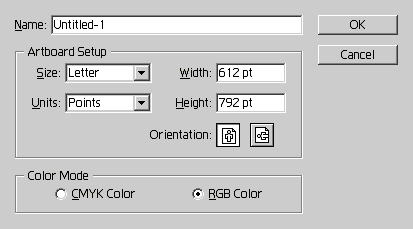
| The New Document dialog box will appear. You will be prompted to enter a filename and select certain Artboard Setup options, such as the Artboard size, units of measurement, and orientation. The Artboard setup size options include standard paper sizes (e.g., letter, legal and tabloid), as well as standard Web graphic sizes (e.g., 640 x 480 and 800 x 600). In addition, you can select a color mode, either CMYK (for print output) or RGB (for Web output). |
| |
 |
| |
| Illustrator New Dialog Box |
| |
| To change the Artboard size after it is initially set, follow these basic steps: |
| |
| File > Document Setup > edit Artboard Size field |
| |
| Notice that the default unit of measurement is point size. To change the units of measurement for the new file only: |
| |
| File > Document Setup > edit Units field |
| |
| To change the default units of measurement for future documents: |
| |
| Edit > Preferences > Units & Undo |
| |
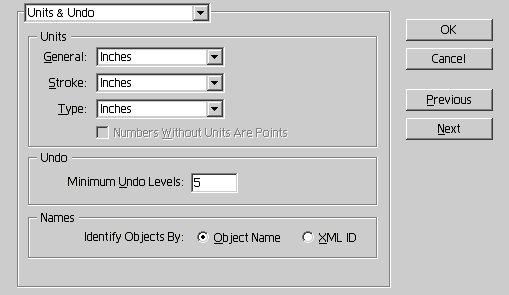
| The Preferences dialog box includes three fields for Units of measurement: General (used for rulers and dialog boxes), Stroke (used on the Stroke Palette), and Type (used on palettes associated with text such as the Character and Paragraph Palettes. |
| |
 |
| |
| Illustrator Preferences Dialog Box |
| |
| Notice that the Units & Undo preferences dialog box also includes a field to set the minimum number of undo levels. |
| |
| |
|
| |


