| Introduction of Illustrator |
| |
| Opening and Importing of graphic images |
| |
| You can open files that were created in Illustrator as well as files that were created in other applications. |
| |
| • To open an existing file, choose File > Open. Locate the file, and click Open. |
| |
| • To open a recently saved file, choose the file from the Open A Recent Item list in the Welcome screen, or choose File > Open Recent Files, and choose a file from the list. |
| |
| • To open and preview a file using Adobe Bridge, choose File > Browse to open Adobe Bridge. Locate the file and choose File > Open With > Adobe Illustrator CS3. |
| |
| However, there are two common ways to open images in Illustrator: the Open command and the Place command. Both options will import graphic images; however: |
| |
| • The Open command creates a new Illustrator file containing the image (even if the image was created in a program other than Illustrator). |
| |
| File > Open |
| |
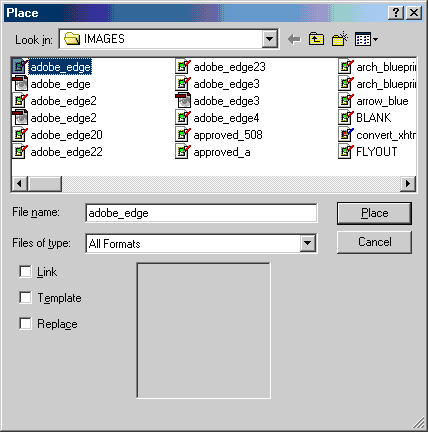
| • The Place command inserts the image into an open Illustrator document, i.e., the Place command only works when an Illustrator document is already open. |
| |
| File > Place |
| |
| Illustrator converts vector graphics (graphics made up of lines and curves defined by mathematical objects called vectors) into Illustrator paths (one or more straight or curved segments) that can be edited with any Illustrator tool. Bitmap images (images made up of pixels) can be opened in Illustrator and edited or modified with certain Illustrator tools. |
| |
| In addition to the standard File > Open option, Illustrator includes a way to easily open any of the ten most recently opened files: |
| |
| File > Open Recent > click filename |
| |
| The Open Recent option displays the last 10 documents opened in Illustrator. Selecting a file from the list will automatically open that file in Illustrator. The nice thing about this feature is that you don't have to know the location or path of the file; you simply click on the filename and it opens. |
| |
| As indicated above, the Place command only works when an Illustrator document is already open. Using the Place command allows the image to be embedded in or linked with the Illustrator file. |
| |
 |
| |
| Illustrator Place Command Dialog Box |
| |
| Embedding the image includes it in the Illustrator file. Linked files, on the other hand, are independent of the Illustrator file, therefore making the file size smaller. The Link checkbox is just below the Files of type field; check it to link the file rather than embed it. The Links Palette provides control to help manage linked images. |
| |
| |
|
| |


