| Creating Charts |
| |
| Move & Resize your Chart Sheet |
| |
| By default, when you create a chart, Excel embeds the chart in the active worksheet. However, you can move a chart to another worksheet or to a chart sheet. A chart sheet is a sheet dedicated to a particular chart. By default Excel names each chart sheet sequentially, starting with Chart1. You can change the name. |
| |
| Move a Chart to a Chart Sheet |
| |
 |
| |
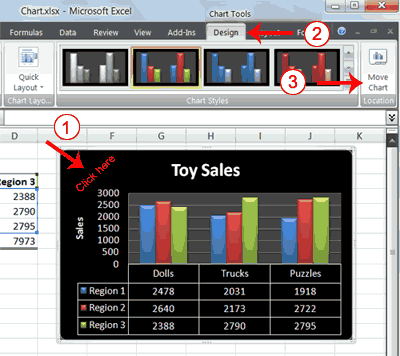
1. Click your chart. The Chart Tools become available.
2. Choose the Design tab.
3. Click the Move Chart button in the Location group. The Move Chart dialog box appears. |
| |
 |
| |
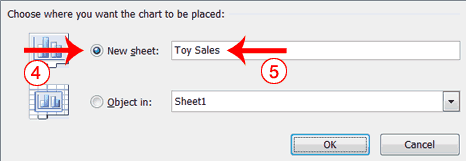
4. Click the New Sheet radio button.
5. Type Toy Sales to name the chart sheet. Excel creates a chart sheet named Toy Sales and places your chart on it. |
| |
| Change the Size and Position of a Chart |
| |
 |
| |
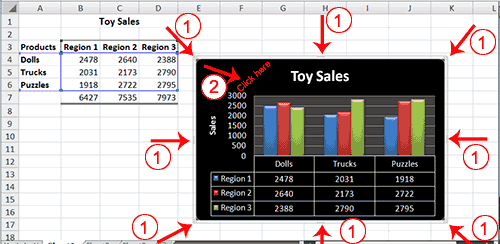
1. Use the handles to adjust the size of your chart.
2. Click an unused portion of the chart and drag to position the chart beside the data. |
| |
| For Animated Presentaiton Click Here! |
| |
| |
|
| |
| |


