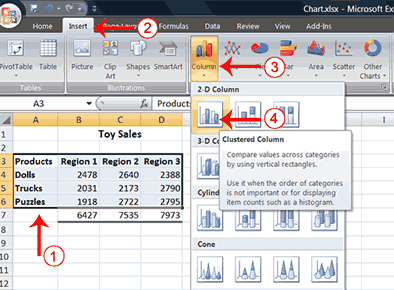
2. Choose the Insert tab.
3. Click the Column button in the Charts group. A list of column chart sub-types types appears.
4. Click the Clustered Column chart sub-type. Excel creates a Clustered Column chart and the Chart Tools context tabs appear.
 |
 |
 |
| Creating Charts | |||
| Creating a Chart | |||
| In Microsoft Excel , you can represent numbers in a chart. On the Insert tab, you can choose from a variety of chart types, including column, line, pie, bar, area, and scatter. | |||
| The basic procedure for creating a chart is the same no matter what type of chart you choose. As you change your data, your chart will automatically update. | |||
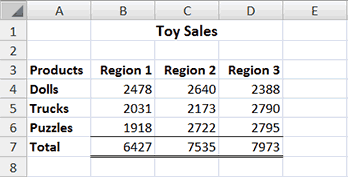
| To create the column chart shown above, start by creating the worksheet below exactly as shown. | |||
|
|||
| After you have created the worksheet, you are ready to create your chart. | |||
| Create a Column Chart | |||
|
|||
| 1. Select cells A3 to D6. You must select all the cells containing the data you want in your chart. You should also include the data labels. 2. Choose the Insert tab. 3. Click the Column button in the Charts group. A list of column chart sub-types types appears. 4. Click the Clustered Column chart sub-type. Excel creates a Clustered Column chart and the Chart Tools context tabs appear. |
|||
| For Animated Presentaiton Click Here! | |||
|
|||