| Functions in Excel 2007 | |||
| AVERAGE function | |||
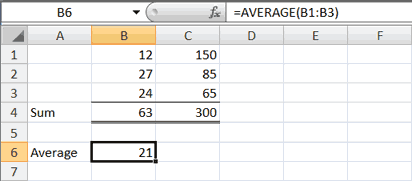
| You can use the AVERAGE function to calculate the average of a series of numbers. | |||
![]() |
|||
1. Move to cell A6. 2. Type Average. Press the right arrow key to move to cell B6. 3. Type =AVERAGE(B1:B3). 4. Press Enter. The average of cells B1 to B3, which is 21, appears. |
|||
| Calculate an Average with the AutoSum Button | |||
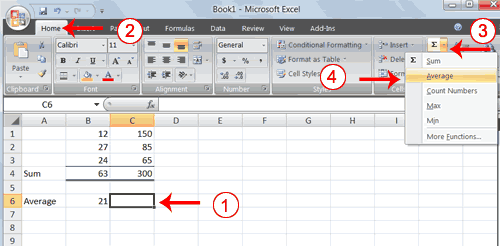
| In Microsoft Excel, you can use the AutoSum button to calculate an average. | |||
![]() |
|||
1. Move to cell C6. 2. Choose the Home tab. 3. Click the down arrow next to the AutoSum button . 4. Click Average. |
|||
![]() |
|||
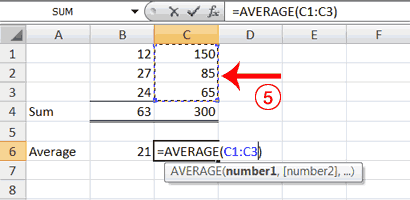
| 5. Select cells C1 to C3. 6. Press Enter. The average of cells C1 to C3, which is 100, appears. |
|||
| For Animated Presentaiton Click Here! | |||