| Functions in Excel 2007 |
| |
| The Sum Function in Excel 2007 |
| |
| Functions are prewritten formulas. Functions differ from regular formulas in that you supply the value but not the operators, such as +, -, *, or /. For example, you can use the SUM function to add. When using a function, remember the following: |
| |
1)	Use an equal sign to begin a formula.
2)	Specify the function name.
3)	Enclose arguments within parentheses.
|
| |
| Arguments are values on which you want to perform the calculation. For example, arguments specify the numbers or cells you want to add. |
| |
| - Use a comma to separate arguments. |
| |
| Here is an example of a function: |
| |
| =SUM(2,13,A1,B2:C7) |
| |
| Functions |
| |
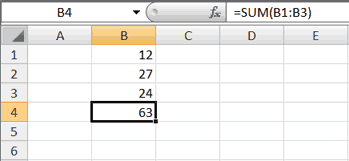
| The SUM function adds argument values. |
| |
 |
| |
1.	Open Microsoft Excel.
2.	Type 12 in cell B1.
3.	Press Enter.
4.	Type 27 in cell B2.
5.	Press Enter.
6.	Type 24 in cell B3.
7.	Press Enter.
8.	Type =SUM(B1:B3) in cell A4.
9.	Press Enter. The sum of cells B1 to B3, which is 63, appears.
|
| |
| For Animated Presentaiton Click Here! |
| |
| |
|
| |
| |


