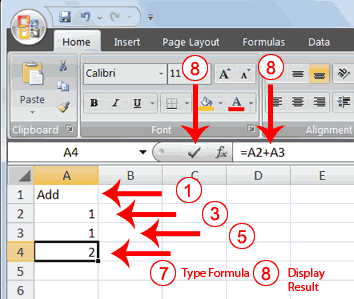
2. Press Enter. Excel moves down one cell.
3. Type 1 in cell A2.
4. Press Enter. Excel moves down one cell.
5. Type 1 in cell A3.
6. Press Enter. Excel moves down one cell.
7. Type =A2+A3 in cell A4.
8. Click the check mark on the Formula bar. Excel adds cell A1 to cell A2 and displays the result in cell A4. The formula displays on the Formula bar.
 |
 |
 |