| Formulas in Excel 2007 |
| |
| Subtraction |
| |
 |
| |
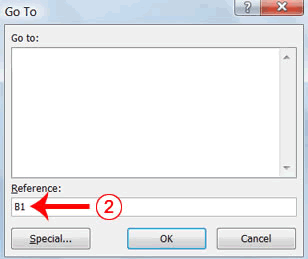
1. Press F5. The Go To dialog box appears.
2. Type B1 in the Reference field.
3. Press Enter. Excel moves to cell B1. |
| |
 |
| |
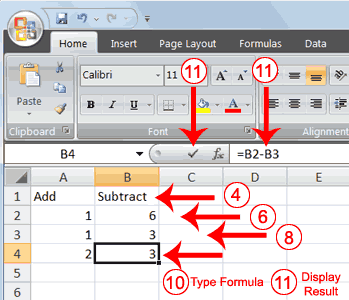
4. Type Subtract.
5. Press Enter. Excel moves down one cell.
6. Type 6 in cell B2.
7. Press Enter. Excel moves down one cell.
8. Type 3 in cell B3.
9. Press Enter. Excel moves down one cell.
10. Type =B2-B3 in cell B4. |
| |
| 11. Click the check mark on the Formula bar. Excel subtracts cell B3 from cell B2 and the result displays in cell B4. The formula displays on the Formula bar. |
| |
| |
| For Animated Presentaiton Click Here! |
| |
| |
|
| |
| |


