| Make a Start with Excel |
| |
| Centre Text and Numbers |
| |
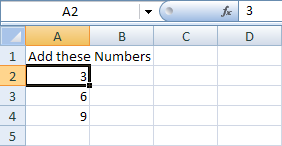
| You saw that by clicking inside of a cell it makes it active, so that you can make changes. We want to centre all our numbers and the text. Here's the spreadsheet we have: |
| |
 |
| |
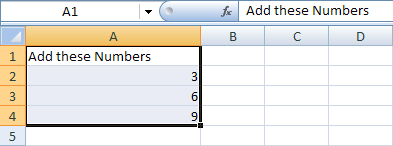
| So we need cells A1, A2, A3 and A4 to be active. In Excel 2007, you can do this by highlighting the cells. |
| |
. Place your mouse over cell A1
. Your pointer should now be in the shape of a white cross
. When your pointer changes to the white cross, hold your left mouse button down and drag to cell A4
. Let go of the left mouse button when cells A1, A2, A3 and A4 are highlighted
. The image below shows what you are aiming for |
| |
 |
| |
| The cells highlighted in the image above have a different color to the normal white color of a cell. When you highlight cells, you can do things to all the cells as a group. |
| |
| To centre the text and numbers in our highlighted cells, try this: |
| |
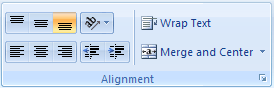
| . From the Excel 2007 Ribbon at the top of the screen, locate the Alignment panel: |
| |
 |
| |
| You can see the various alignment options laid out. These ones: |
| |
 |
| |
| Hold your mouse over each alignment icon and you'll see an explanation of what they do. Click each icon and see what they do to your highlighted cells. |
| |
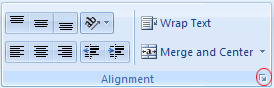
| You can also click the arrow in the bottom right of the Alignment panel to bring up the Format Cells box (the one circled below). |
| |
 |
| |
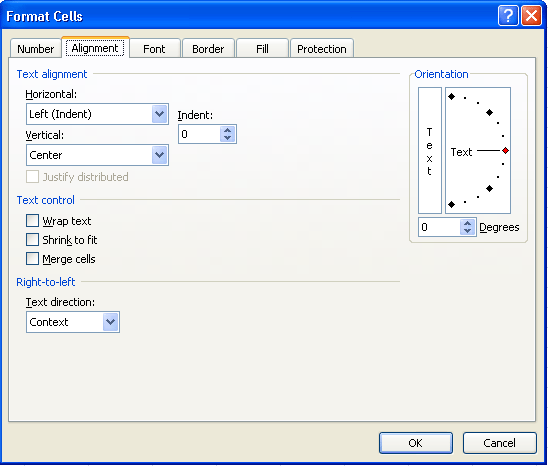
| When you click the arrow, you'll see this dialogue box: |
| |
 |
| |
| Notice the Text Alignment section at the top of the Alignment tab. It has two drop down menus, one for Horizontal alignment and one for Vertical alignment. |
| |
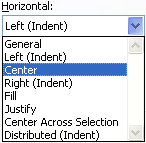
. Click the arrow on the Horizontal drop down menu, the one with Left (Indent) on it
. You'll see the following: |
| |
 |
| |
| As you can see, you have plenty of options to choose from in Excel 2007. But click on Center. Do the same for the Vertical drop down menu. Then click OK at the bottom of the Format Cells dialogue box. |
| |
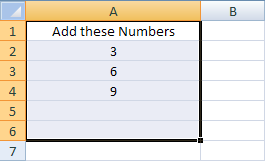
| The text and numbers in cells A1, A2, A3 and A4 should now be centered, and your spreadsheet will look like the one below: |
| |
 |
| |
| For Animated Presentaiton Click Here! |
| |
| |
| |
|
| |
| |


