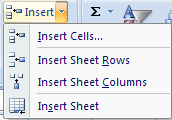
. Click the Insert button on the Cells group of the Home tab
. Click the appropriate choice: Cell, Row, or Column
 |
 |
| Modifying a Worksheet | ||
| Insert New Cells, Rows, and Columns | ||
| To insert cells, rows, and columns in Excel: | ||
| . Place the cursor in the row below where you want the new row, or in the column to the left of where you want the new column . Click the Insert button on the Cells group of the Home tab . Click the appropriate choice: Cell, Row, or Column |
||
|
||
| For Animated Presentaiton Click Here! | ||
|
||