| A First Look at Excel 2007 |
| |
| The Ribbon |
| |
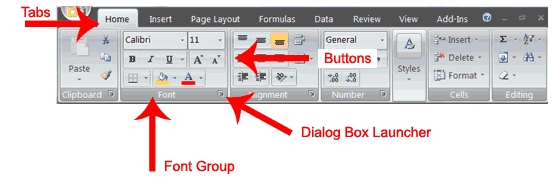
| You use commands to tell Microsoft Excel what to do. In Microsoft Excel 2007, you use the Ribbon to issue commands. The Ribbon is located near the top of the Excel window, below the Quick Access toolbar. At the top of the Ribbon are several tabs; clicking a tab displays several related command groups. |
| |
 |
| |
| Within each group are related command buttons. You click buttons to issue commands or to access menus and dialog boxes. You may also find a dialog box launcher in the bottom-right corner of a group. When you click the dialog box launcher, a dialog box makes additional commands available. |
| |
| |
|
| |
| |


