| A First Look at Excel 2007 |
| |
| Quick Access Toolbar |
| |
| The Quick Access toolbar in Microsoft Office Excel 2007 appears above the Ribbon, to the right of the Office button, and includes buttons for commands you use often. By default, the Quick Access toolbar contains only the Save, Undo, and Redo commands. |
| |
| To display the Quick Access toolbar beneath the Ribbon, click the Customize Quick Access Toolbar button (on the right end of the toolbar) and choose Show Below the Ribbon on the drop-down menu. |
| |
| Add buttons to the Quick Access toolbar |
| |
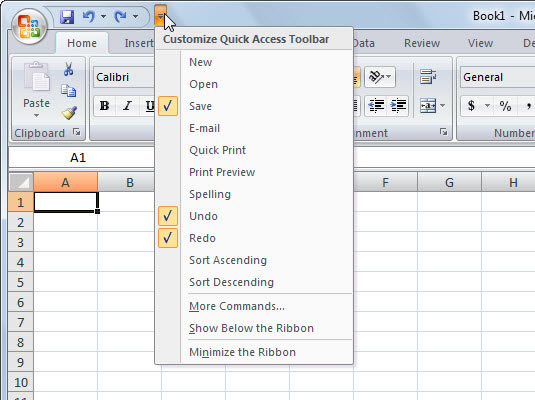
| You can click the Customize Quick Access Toolbar button to easily add other common Excel 2007 commands to this toolbar. The resulting drop-down menu contains the following commands: New, Open, E-mail, Quick Print, Print Preview, Spelling, Sort Ascending, and Sort Descending. |
| |
 |
| |
| Use this menu to add common commands to the Quick Access toolbar. |
| |
| To add any of these commands to the toolbar, simply click the option on the drop-down menu. Excel adds a button for that command to the end of the Quick Access toolbar (and a check mark to its option on the drop-down menu). |
| |
| To add any Ribbon command to the Quick Access toolbar, right-click the command button on the Ribbon and then choose Add to Quick Access Toolbar on the shortcut menu. |
| |
| The Title Bar |
| |
 |
| |
| Next to the Quick Access toolbar is the Title bar. On the Title bar, Microsoft Excel displays the name of the workbook you are currently using. At the top of the Excel window, you should see "Microsoft Excel - Book1" or a similar name. |
| |
| |
|
| |
| |


