| A First Look at Excel 2007 |
| |
| Worksheets |
| |
| Microsoft Excel consists of worksheets. Each worksheet contains columns and rows. The columns are lettered A to Z and then continuing with AA, AB, AC and so on; the rows are numbered 1 to 1,048,576. The number of columns and rows you can have in a worksheet is limited by your computer memory and your system resources. |
| |
 |
| |
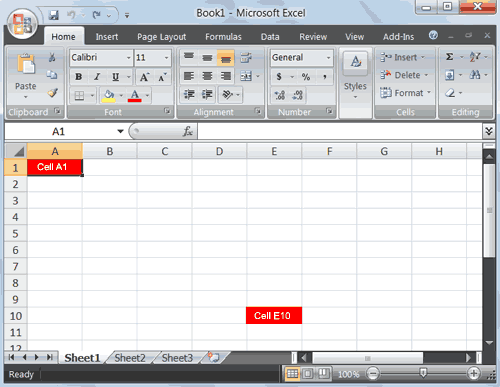
| The combination of a column coordinate and a row coordinate make up a cell address. For example, the cell located in the upper-left corner of the worksheet is cell A1, meaning column A, row 1. Cell E10 is located under column E on row 10. You enter your data into the cells on the worksheet. |
| |
| |
|
| |
| |


