| Working with Bitmaps |
| |
| Art Strokes |
| |
| For creating any artistic effect on bitmap you can use artstroke effect of bitmap. CorelDraw provides number of artistic effects which can be applied on bitmap images. These are Charcoal, Crayon stroke, Pen and ink, water color, wave paper, impressionist. |
| |
| For any Artistic Stroke on bitmap |
| |
| • Go to Bitmap>Art Stokes |
| |
| • Select from the drop-down list. |
| |
| Anyhow you can apply any of these artistic stroke effects on your bitmap image and check out changes. |
| |
| For charcoal effect on your bitmap image |
| |
| • Select bitmap image. |
| |
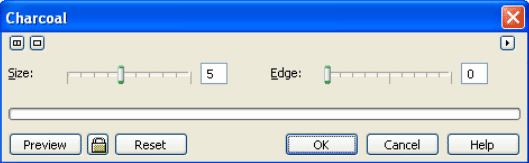
| • Go to Bitmap>Artistic Stroke> Charcoal. |
| |
| • A dialog box will appear on the screen. |
| |
 |
| |
| • Drag your mouse in the right direction to increase the size of charcoal. |
| |
| • For increasing value of edge of charcoal drag in the right direction. |
| |
| • Click Ok. |
| |
| • After Charcoal effect bitmap image would something like this: |
| |
 |
| |
| |
|
| |


