| Working with various Objects & Shapes |
| |
| Welding of Objects |
| |
| Welding is, melting of the overlapped parts and converting the two objects into one. You can create irregular shapes by welding and intersecting objects. You can weld almost any object, including clones, objects on different layers, and single objects with intersecting lines. |
| |
| Example: |
| |
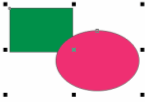
| . Select Rectangle tool and draw a rectangle. |
| |
| . Select Ellipse tool and draw another circle so as to overlap rectangle. |
| |
| . Select Pick tool and select both rectangle and circle. |
| |
 |
| |
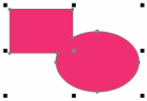
| . Go to Arrange > Shaping > Weld |
| |
| . Both objects are joined and formed one single shape, melting the overlapped part. |
| |
 |
| |
| You can weld objects regardless of whether they overlap each other. If you weld objects that do not overlap, they form a weld group that acts as a single object. In both cases, the welded object takes on the fill and outline attributes of the target object. |
| |
| |
|
| |


