| Basics of CorelDRAW |
| |
| Working with Edit Tools : |
| |
| Knife Tool: is for cutting the objects. Knife tool is one of the more descriptively named weapons in the toolbar. It can cut objects in two! The basic routine is that you click twice on an object to make "incision points," and those points become a line that divides your object into two, new objects. |
| |
| Here is an example of knife tool. |
| |
| • Create a Triangle. |
| |
| • Select Knife tool. |
 |
|
| |
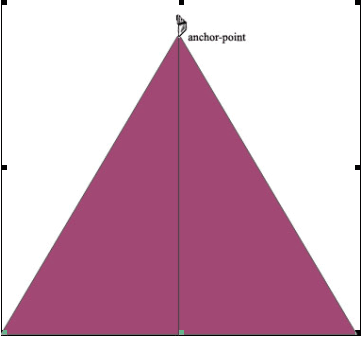
| • Click at a point on a shape that you want to cut as shown: |
| |
 |
| |
| • Click a second time at the endpoint of the cut. After you cut your shape, use the Pick tool to select either of the two new shapes you created. You can drag to move either of the two objects, or delete one of them. |
| |
 |
Eraser tool: is for erasing any part of the object. |
|
| |
| An example here is given below of eraser tool. |
| |
| • Select the object with pick tool. |
| |
| • Click on eraser tool from the crop tool flyout |
 |
|
| |
| • Drag on the part of object you want to erase. |
| |
| Virtual Segment delete tool: is the last tool of the crop tool flyout. |
| |
| This tool works where two objects intersects. |
| |
| An example below explains virtual segment delete tool. |
| |
| • Draw a rectangle |
| |
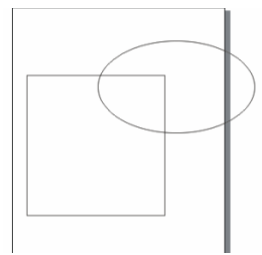
| • Draw another object ie circle intersecting rectangle as shown below: |
| |
 |
| |
| • Pick virtual segment tool. |
| |
| • Click on the circle outside the rectangle. |
| |
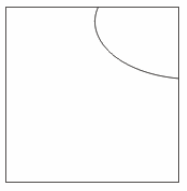
| • You will find only the portion which is outside the rectangle is deleted as shown below. |
| |
 |
| |
| Note: Virtual Segment tool can be used for intersecting two objects. |
| |
| |
|
| |


