| Getting Started |
| |
| Printing of a document: |
| |
| In the CorelDRAW, you can print one or more copies of the same drawing. You can specify what to print, as well as which parts of a drawing to print; for example, you can print selected vector objects, bitmaps, text, or layers. |
| |
| Before printing a drawing, you can specify printer properties, including paper size and device options. |
| |
| For Printing: |
| |
| . Go to File Menu |
| |
| . Click Print |
| |
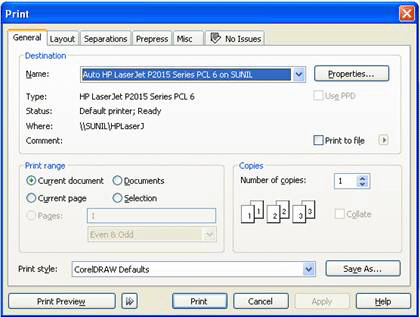
| The following dialog box will appear on the screen as shown below: |
| |
 |
| |
| . Click the General Tab |
| |
| . Choose a printer from the Name list box. |
| |
| . Type a value in the Number of copies box. |
| |
| If you want the copies collated, enable the Collate check box.
Enable one of the following options: |
| |
| . Current document - prints the active drawing |
|
| . Current page - prints the active page |
| |
| . Pages - prints the pages that you specify |
| |
| . Documents - prints the documents that you specify |
| |
| . Selection - prints the objects that you have selected |
| |
| For setting printing properties |
| |
| . Click the General Tab |
| |
| . Click Properties |
| |
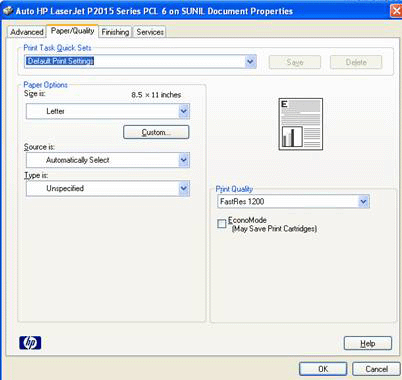
| Following dialog box will appear on the screen: |
| |
 |
| |
| . Click on Paper/Quality |
| |
| . Mention the paper size on which size you want to print ie A4 size, Letter size etc. |
| |
| . Mention the Type of paper |
| |
| . Mention Print Quality on which (dpi) you want to print. |
| |
| . Tick on EconoMode. It saves print cartridge of printer. |
| |
| . Click OK to print |
| |
| To print on both sides of your page |
| |
| . Click on Print Properties |
| |
| . Click the General Tab |
| |
| . Click Properties |
| |
| . Click on Finishing |
| |
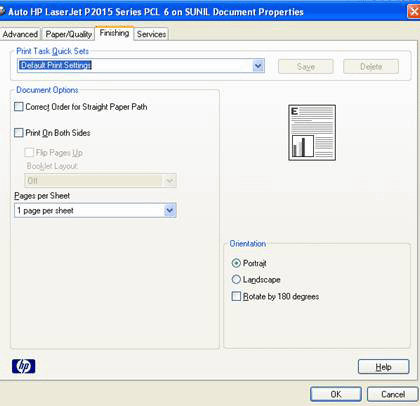
| Following dialog box will appear on your screen |
| |
 |
| |
| . Tick on Print on Both Sides |
| |
| . Choose the Paper per sheet as how many pages you want to print on sheet. |
| |
| . On which direction you want your document to print ie in Portrait or in Landscape. |
| |
| If you want to print your document or drawing in the Center of the sheet |
| |
| . Click on Print Properties |
| |
| . Click on Layout |
| |
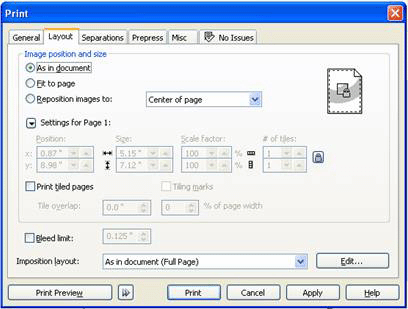
| A dialog box will appear on the screen as shown below: |
| |
| . Click on the Reposition images to |
| |
| . Select center of the page from it |
| |
 |
| |
| If your drawing is big in comparison to your printer and if you want to print it on A4 size paper then |
| |
| . Click on Layout |
| |
| . Select Fit to Page |
| |
| . Click Apply |
| |
| |
|
| |


