| Handling Queries |
| |
| Finding Duplicate Query |
| |
| 1. Click the New button on the Queries
database window, select Find Duplicates Query Wizard from
the New Query window and click OK. |
| |
|
| |
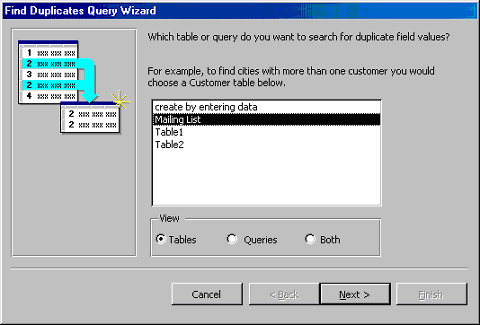
| 2. Select the table or query that the find duplicates query
will be applied to from the list provided and click Next >. |
| |
|
| |
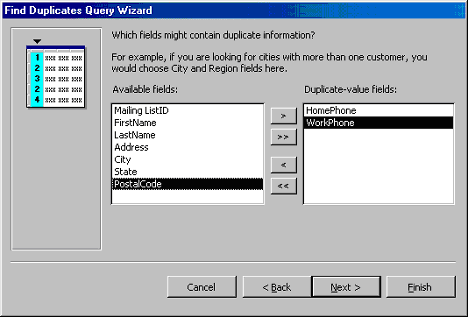
| 3. Select the fields that may contain duplicate values by
highlighting the names in the Available fields list and clicking
the > button to individually move the fields to the Duplicate-value
fields list or >> to move all of the fields. Click Next > when all
fields have been selected. |
| |
|
| |
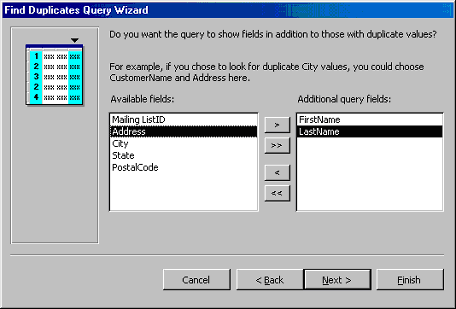
| 4. Select the fields that should appear in the new
query along with the fields selected on the previous
screen and click Next >. |
| |
|
| |
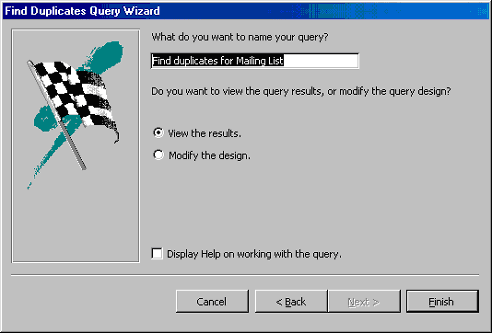
| Name the new query and click Finish. |
| |
|
| |
| |
|
| |
| |