| Handling Queries |
| |
| Query wizards |
| |
| Click the Create query by using wizard
icon in the database window to have access step you through the process of creating |
| |
|
| QUERY |
| |
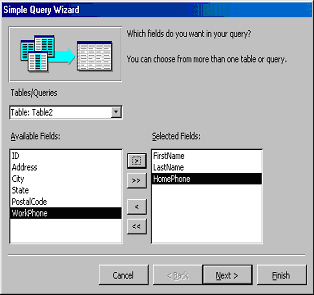
| 1. From the first window, select fields that will be
included in the query by first selecting the table from the
drop-down Tables/Queries menu. Select the fields by clicking
the > button to move the field from the Available Fields list
to Selected Fields. Click the double arrow button >> to move
all of the fields to Selected Fields. Select another table or
query to choose from more fields and repeat the process of
moving them to the Selected Fields box. Click Next > when all
of the fields have been selected. |
| |
|
| |
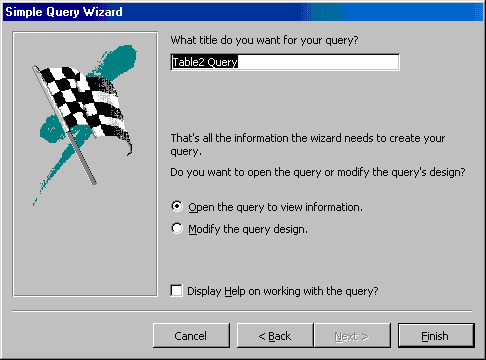
| 2. On the next window, enter the name for the query and click Finish. |
| For the viewlet of Table in Query Wizard.Click Here! |
| |
| |
|
| |
| |