| What's New? |
| |
| Secrity Center |
| |
 |
| |
| |
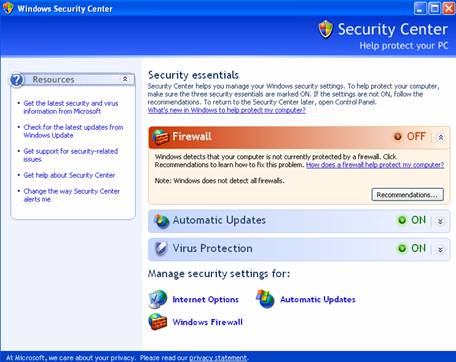
| One new feature of Windows XP is the Security Center. The Security Center provides a place where you can check the settings of three ways to help secure your computer: |
| |
| • Windows Firewall |
| |
| • Automatic Updates |
| |
| • Antivirus Software |
| |
| |
| Windows Firewall |
| |
| The Windows Firewall helps to protect your computer from attacks by restricting how other people can access your computer over the Internet. It helps to ensure that nothing gets into your computer that you want to keep out, like viruses or other threats. |
| |
| The Windows Firewall is on by default, and you can check the status of the Windows Firewall by opening the Security Center. You can also set up exceptions for the firewall and change advanced settings in the Security Center. |
| |
| |
| Automatic Updates |
| |
| Automatic Updates is a Windows XP component that allows your computer to automatically get important updates from Microsoft. Occasionally, someone finds a vulnerability in Windows XP that could be used to harm your computer. Microsoft releases updates that fix the vulnerability. If Automatic Updates is enabled, Windows XP will automatically get the update and install it for you when you're connected to the Internet. |
| |
| You can check the status of Automatic Updates in the Security Center. You can change some settings for Automatic Updates in the Seucirty Center, such as setting Automatic Updates to alert you when updates are available instead of downloading and installing them automatically. |
| |
| |
|
| |
| |


