 |
 |
 |
| Different Settings for Page | |||
| What is Page Break? | |||
| You can include a Page Break anywhere in your document. You can also specify where Word positions automatic page breaks. | |||
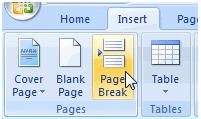
| For Insert a Page Break follow these steps: | |||
| 1. Click where you want to start a new page. | |||
| 2. Click the Insert tab on the Ribbon. | |||
| 3. Click Page Break in the Pages group. | |||
|
|||
| Alternatively, you can press Ctrl + Enter to insert a page break from key board shortcut. | |||
| For Animated presentation Click here | |||
|
|||