|
Use Mail Merge |
| |
| Create Labels |
| |
| You can used Labels in a variety of ways to make your work easier. Applying labels to anywhere can save you a lot of time and make organizing your work easier. |
| |
| You can print one label with special information for each record in the table or database. |
| |
| For create an Envelope in Mail Merge follow these steps: |
| |
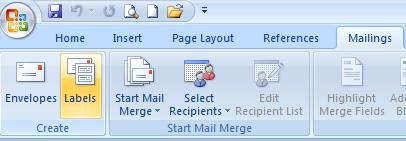
| 1. Click on Mailings tab on the Ribbon. |
| |
| 2. Click on Labels in Create group. |
| |
| You can also select Labels from Start Mail Merge in Start Mail Merge Group.
Select the Options for Envelope.
|
| |
 |
| |
| 3. An Envelopes and Labels dialogue box open. |
| |
| 4. Fill the entries under Address. |
| |
| For Animated presentation Click here |
| |
| |
|
| |


