| Table: Creating & Customizing |
| |
| Spell Check |
| |
| After create a word document it is necessary to check spelling errors and repeated words. Microsoft word gives the facility to proofing word document by use the spell checker. |
| |
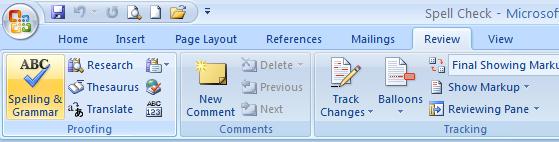
| 1. On the Review tab on the Ribbon, click the Spelling & Grammar button. |
| |
| 2. The Spelling and Grammar dialog box opens and takes you to the first item that Word 2007 assumes is misspelled. |
|
 |
| |
| 3. You can set the way that how Word 2007 treats each item it finds misspelled. |
| |
o Choose one from these actions:
o Ignore Once: Click this button to tell Word 2007 that this entry is fine.
o Ignore All: Click this button to tell Word 2007 that every same spelling of this word is fine.
o Change: First choose (click) a word from the Suggestions panel at the bottom of the dialog box. Then click this button to have Word 2007 insert the corrected word.
o Change All: This works like Change but changes every instance of the misspelling in the document. You must choose a spelling from the Suggestions panel.
|
| |
| 4. Click Close to exit the dialog box. |
| |
| For Animated presentation Click here |
| |
| |
|
| |


