| Table: Creating & Customizing |
| |
| Method for Create a Table |
| |
| Microsoft Word 2007 facilitates you to add tables to your documents. Tables are used to display data in a table format. |
| |
| You can choose the number of columns and rows as per your need and change the appearance of your table with design options that customize formatting and styles. |
| |
| To create a table, simply follow these Steps: |
| |
| 1. Place the cursor on the page where you want the new table |
| |
| 2. Click the Insert Tab of the Ribbon |
|
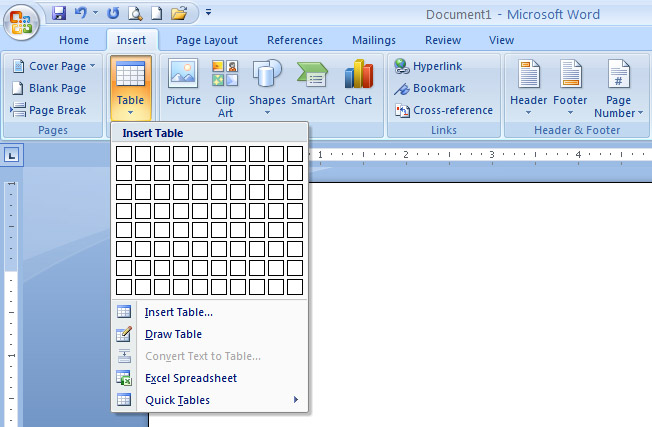
| 3. Click the Tables Button on the Tables Group. You can create a table one of four ways: |
| |
| (i) Highlight the number of row and columns |
| (ii) Click Insert Table and enter the number of rows and columns |
| (iii) Click the Draw Table, create your table by clicking and entering the rows and columns |
| (iv) Click Quick Tables and choose a table |
| |
 |
| |
| For Animated presentation Click here |
| |
| |
|
| |


