 |
 |
 |
| Working with Graphics | |||
| Page Border | |||
| Page border is one such feature enables you to add a border around text or other page contents. | |||
| Page borders in Word 2007 can spice up your Word documents And can be applied to each page in a section or the entire document, or to a single page within the word document. | |||
| You can add page borders of different styles, colors, sizes and art. | |||
| To add a page border in Word 2007 follow these steps: | |||
| 1. Open your document. | |||
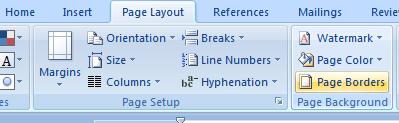
| 2. Click the Page Layout tab | |||
| 3. Click Page Borders in the Page Background group | |||
| 4. Verify that the Page Border tab is selected in the Borders and Shading dialog box. | |||
| 5. Click a border option under Settings. | |||
| 6. Select the style, color and border width you want to apply. | |||
| 7. Under Apply to, choose what part of the document you want to apply the border to. | |||
| 8. Click Ok. | |||
|
|||
|
|||