 |
 |
 |
| Working with Graphics | |||
| Aligning Graphics | |||
| When you want to Aligning your inserted picture into a document of Microsoft Word-2007. | |||
| Simply follow these steps: | |||
| 1. Select the picture. | |||
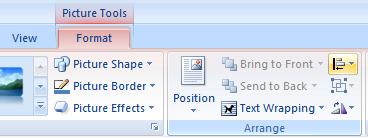
| 2. Go to the Format tab. | |||
| 3. Click on Align in the Arrange group. | |||
|
|||
| If the Arrange group is collapsed and Position isn't visible, click the Arrange button, and then click Position. | |||
| 4. Select one of the Align positions that you want to apply. | |||
|
|||