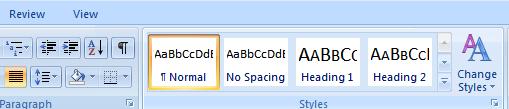
In the Styles group on the Home tab, Click the Change Styles button.
Select Style Set, then choose anyone of the given style (Such as: Word 2003).
 Word 2003 Style
 |
 |
 |
| Paragraph Formatting | |||
| Change Alignment of Paragraph | |||
| Follow these steps for change spacing between Paragraphs & Lines: | |||
| 1. To change the line spacing in Word 2007, Click on Home tab Ribbon of the Application window. | |||
|
|||
| 2. The fastest way to change the line spacing in Word 2007 is by altering the "style". In the Styles group on the Home tab, Click the Change Styles button. Select Style Set, then choose anyone of the given style (Such as: Word 2003). |
|||
| Word 2003 Style |
|||
| 3. Now, to make a style (such as: word 2003) to your default setting, click the Change Styles button again, and choose Set as Default. | |||
|
|||
| 4. The Word 2007 line spacing has now been set to the way it was in Word 2003 - which is single spacing. | |||
| Now, whenever you open a Blank Document in Microsoft Word 2007, the line spacing will be single space with no extra space between paragraphs. | |||
| For Animated presentation Click here | |||
|
|||