| Paragraph Formatting |
| |
| Add Borders & Shading on Page |
| |
| You can add borders and shading to paragraphs and entire pages. To create a border around a paragraph or paragraphs follow the below steps. |
| |
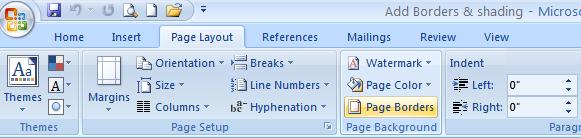
• Step 1:
(a). Select the text
(b). Click the Page Layout tab.
(c). Click the Page Borders button.
|
| |
 |
| |
• Step 2:
(a). Click the Borders tab.
(b). Click a box setting to modify all border edges.
(c). Click the edge in the diagram to modify individual border edges.
(d). Click a border style, color, and width. |
| |
• Step 3:
(a). Click the Shading tab.
(b). Click the Fill list arrow, and then click a fill color.
(c). Click OK. |
| |
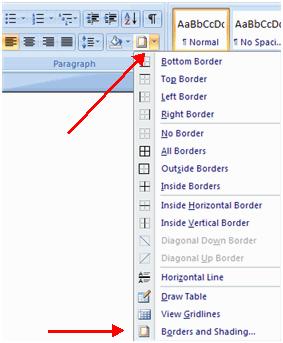
| There alternative method for add borders and shading to paragraphs and entire pages is given below: |
| |
| • Select the area of text where you want the border or shading. |
| • Click the Borders Button on the Paragraph Group on the Home Tab |
| • Choose the Border and Shading |
| • Choose the appropriate options |
| |
 |
| |
| For Animated presentation Click here |
| |
| |
|
| |


