| Paragraph Formatting |
| |
| Indent Paragraphs |
| |
| Indenting paragraphs allows you set text within a paragraph at different margins (the left or the right margin). |
| |
| Within the margins, you can increase or decrease the indentation of a paragraph or group of paragraphs. |
| |
| There are numerous options for indenting: |
| |
| • First Line: Controls the left boundary for the first line of a paragraph |
| |
| • Hanging: Controls the left boundary of every line in a paragraph except the first one |
| |
| • Left: Controls the left boundary for every line in a paragraph |
| |
| • Right: Controls the right boundary for every line in a paragraph |
| |
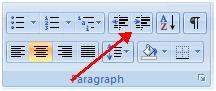
| For indent paragraphs, you can do the following: |
| |
| • To control the indent : Click the Indent buttons |
| |
| • To increase the size of the indent : Click the Indent buttons repeated times |
| |
 |
| |
| • Click the dialog box of the Paragraph Group |
| |
| • Click the Indents and Spacing Tab |
| |
| • Select your indents |
| |
| For Animated presentation Click here |
| |
| |
|
| |


