| Different Operation's on Document |
| |
| Close a Document |
| |
| To close a document: |
| |
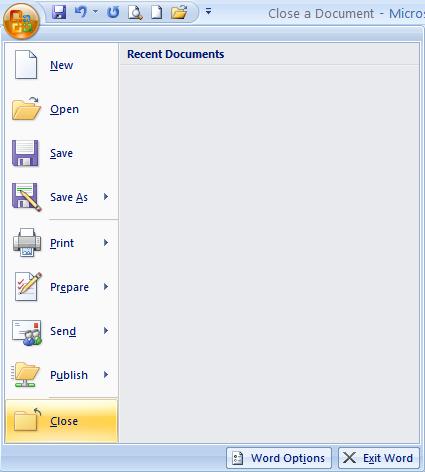
1. Click the Microsoft Office Button . . |
| |
| 2. Click Close |
| |
 |
| |
| This doesn't quit Word, but it removes the document from the screen, allowing you to stay in Word or work on another document. |
| |
| You can follow these steps also: |
| |
| 1. Choose Exit button in the window's upper-right corner. |
| |
| 2. The Exit button is the last of the three buttons in the window's upper-right corner. |
| |
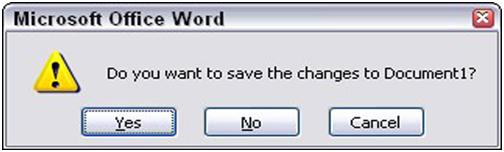
| 3. Save any files when Word prompts you to do so. |
| |
 |
| |
| o Click Yes to save your file. You may be asked to give the file a name, if you haven't yet done so. |
| |
| o If it isn't worth saving, click No. |
| |
| o Click Cancel to "quit" the Exit Word command and return to Word. |
| |
| For Animated presentation Click here |
| |
| |
|
| |


