| SQL Commands |
| |
| SQL WHERE Clause |
| |
| The WHERE clause is used to specify a selection criterion. |
| |
| The WHERE Clause |
| To conditionally select data from a table, a WHERE clause can be added to the SELECT statement. |
| |
| Syntax |
|
| |
| |
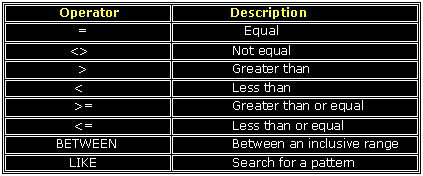
| With the WHERE clause, the following operators can be used: |
| |
|
| |
| |
| Using the WHERE Clause |
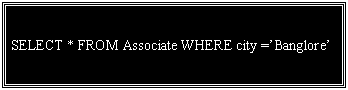
| To select only the persons living in the city "Banglore", we add a WHERE clause to the SELECT statement: |
|
| |
| |
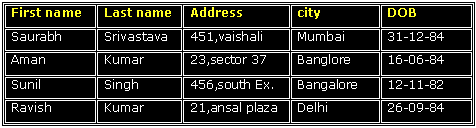
| Table name “Associate” |
|
| |
| Result |
|
| |
| |
| Using Quotes |
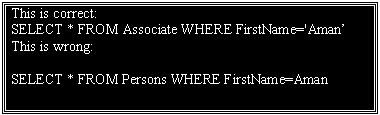
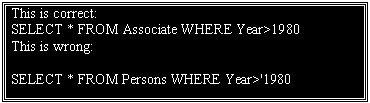
| Note that we have used single quotes around the conditional values in the examples. |
| |
| SQL uses single quotes around text values (most database
systems will also accept double quotes). Numeric values should not be enclosed in quotes. |
| |
|
| |
|
| |
| The LIKE Condition |
| The LIKE condition is used to specify a search for a pattern in a column. |
| Syntax |
 |
| A "%" sign can be used to define wildcards (missing letters in the pattern) both before and after the pattern. |
| |
| Using LIKE |
 |
| result: |
 |
| |
 |
| Result:- |
 |
| |
| |
|
|
| |
| |