| SQL Commands |
| |
| The SQL SELECT Statement |
| |
| The SELECT statement is used to select data from a table. The tabular result is stored in a result table (called the result-set). |
| |
| Syntax |
|
| |
| |
| SQL SELECT Example |
|
| |
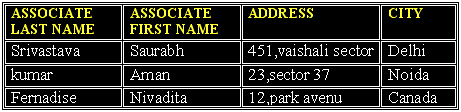
| The Database table “eBIZ” |
| |
|
| |
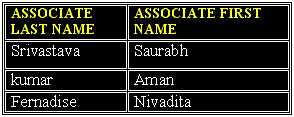
| The Result |
|
| |
| Select All Columns |
| To select all columns from the "eBIZ" table, use a * symbol instead of column names, like this: |
|
| |
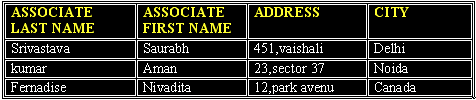
| The Result |
|
| |
| The Result Set |
| The result from a SQL query is stored in a result-set. Most database software systems allow navigation of the result set with programming functions, like: Move-To-First-Record, Get-Record-Content, Move-To-Next-Record, etc. |
| |
| Semicolon after SQL Statements? |
| Semicolon is the standard way to separate each SQL statement in database systems that allow more than one SQL statement to be executed in the same call to the server. |
| |
| The SELECT DISTINCT Statement |
| The DISTINCT keyword is used to return only distinct (different) values. The SELECT statement returns information from table columns. But what if we only want to select distinct elements? |
| |
| Syntax |
|
| |
| Using the DISTINCT keyword |
| To select ALL values from the column named "Company" we use a SELECT statement like this: |
|
| |
| |
| “eBIZ student” table |
|
| |
| Result |
|
| Note that "Upendra Mishra" is listed twice in the result-set. |
| |
| To select only DIFFERENT values from the column named " Paid student " we use a SELECT DISTINCT statement like this: |
|
| |
| Result |
|
| |
| Now "Upendra mishra" is listed only once in the result-set |
| |
| |
|
|
| |
| |