| A First Look at Power Point 2007 |
| |
| Mini Toolbar |
| |
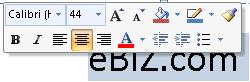
| A different feature in Office 2007 is the Mini Toolbar. |
| |
| This is a moving toolbar that is showed when you select text or right-click text. |
| |
| This Mini toolbar offering a group of the more commonly used commands that you probably want to use. It displays common formatting tools, such as Bold, Italics, Fonts, Font Size and Font Color. |
|
| |
 |
| |
| It saves a lot of time if you are working on a different tab and don't want to switch to the Home tab to perform font related tasks. |
| |
| The mini toolbar sometimes disappears; to get it back, reselect the text or right click the selection. |
| |
| If you don't like the Mini toolbar, you can disable it easily with the following steps: |
| |
| 1. Click the Office button |
| |
| 2. Select PowerPint Options |
| |
| 3. Click Popular in the left column |
| |
| 4. Deselect "Show Mini Toolbar on selection". |
| |
|
| |


