The Ribbon replaces the menus and toolbars in previous versions.
The Ribbon exposes most of the feature that use to be hidden in File Menus. The Ribbon makes it easier to see and find commands to format your document.

 |
 |
 |
| A First Look at Power Point 2007 | |||
| The Ribbon | |||
| Ribbon is an area across the top of the screen that makes almost all the capabilities of PowerPoint available in a single area. The Ribbon replaces the menus and toolbars in previous versions. The Ribbon exposes most of the feature that use to be hidden in File Menus. The Ribbon makes it easier to see and find commands to format your document. |
|||
|
|||
| The Ribbon Customizer lets you organize the Office ribbon to suit your special needs. | |||
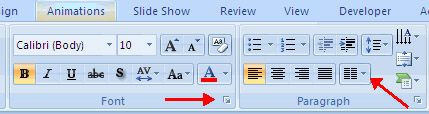
| Commonly utilized features are displayed on the Ribbon. To view additional features within each group, click the arrow at the bottom right corner of each group. | |||
|
|||
| Each Ribbon is divided into different sections, where similar commands are grouped. | |||
| Each of the tabs contains the following tools: | |||
| Home: Clipboard, Slides, Font, Paragraph, Drawing, and Editing | |||
| Insert: Tables, Illustrations, Links, Text, and Media Clips | |||
| Design: Page Setup, Themes, Background | |||
| Animations: Preview, Animations, Transition to this Slide | |||
| Slide Show: Start Slide Show, Set Up, Monitors | |||
| Review: Proofing, Comments, Protect | |||
| View: Presentation Views, Show/Hide, Zoom, Window, Macros | |||
|
|||