| Introduction to MS PowerPoint-2007? |
| |
| Exit from PowerPoint 2007 |
| |
| This lesson does not require you to enter any text. If you would want to exit from Power Point 2007, then you can do the following steps: |
|
| |
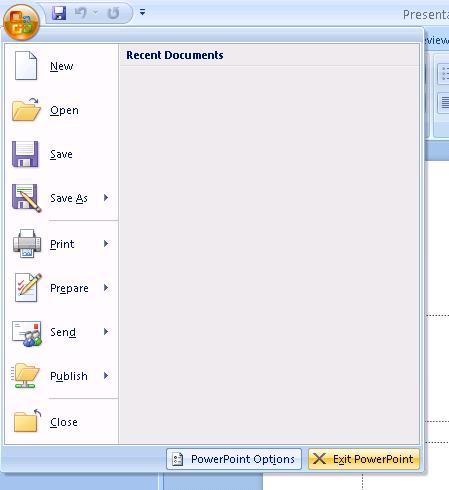
| 1. Click the Microsoft Office button. A menu appears. |
| |
|
| 2. Click Exit, which can be found at the bottom of the drop-down menu. |
| |
 |
| |
| 3. If you have entered text, you will be prompted: "Do you want to save changes to Document1?" To save your changes, click Yes. Otherwise, click No. |
| |
| 4. Specify the correct folder in the Save In box. |
| |
| 5. Name your file by typing eBIZ.pptx in the File Name field. |
| |
| 6. Click Save. |
| |
| You can also Exit from the Close button, which is situated right-side corner on the top. |
| |
| For Animated presentation (With Voice)Click here |
| |
| |
|
| |


