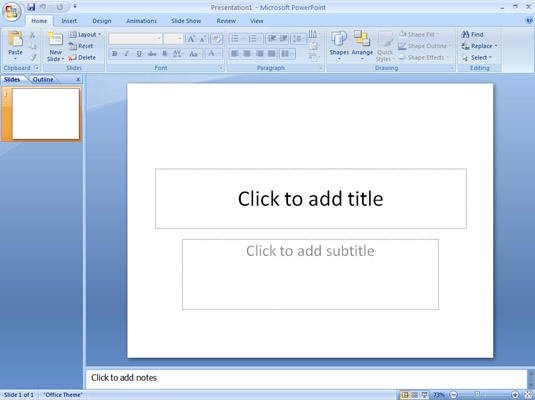
2. Microsoft Office Button
3. Tab
4. Quick Access Tool Bar
5. Title Bar
6. Groups Categories
7. Dialog Box Launcher
8. Slide Pane
9. View Toolbar
10. Notes Pane
 |
 |
 |
| Introduction to MS PowerPoint-2007? | |||
| Application Window of PowerPoint 2007 | |||
| The Power Point 2007 Application Window screen can be customized in various ways. The Power Point 2007 window differs largely from previous versions of Power Point. For those new to Power Point, it is more sensitive. | |||
| Many of the commands and options have been moved out onto what Microsoft dubs the "Ribbon." | |||
| But for experienced users of Power Point, it is a new way of looking at Power Point. Much of what you know you will need to relearn. | |||
| There are some features that you should remember when you work in Power Point 2007: | |||
| 1. Ribbon 2. Microsoft Office Button 3. Tab 4. Quick Access Tool Bar 5. Title Bar 6. Groups Categories 7. Dialog Box Launcher 8. Slide Pane 9. View Toolbar 10. Notes Pane |
|||
|
|||
|
|||