mysql-connector-java-n/ |
Directory with the actual library files; the rest of the entries in this list refer to this directory. |
README |
The documentation to Connector/J. |
/mysql-connector-java-n.jar |
All Java Classes of the driver as a Java archive file; this file is the actual driver. |
/com/* |
All Java classes of the driver as individual files. |
/org/* |
The driver's Java start class under the old driver name (org.gjt.mm.mysql.Driver). |
("jdbc:mysql://localhost:3306/sampleDB",uid,password);
/**
*@author: xyz < xyz@ebizel.com >
*@description: program to check MySQL
Connector/J installation and
MySQL database connectivity from java program
*
*/

public class  Check_MySQL
{
	/**
	*@description: Variabale declration
	*/
static  java.io.PrintStream out=java.lang.System.out;
java.sql.Connection con=null;
static java.lang.String uid="root",password="sa";

	public Check_MySQL()
	{
		try
		{
			out.println("+-----------------------+");
			out.println("+------------------------+");
			out.println("+------------------------+");
			/**
			MySQL Driver instance
			*/
Class.forName("com.mysql.jdbc.Dri ver").newInstance();
			Thread.sleep(500);
			out.println("+-------------------------+");
			out.println("+--------------------------+");
			out.println("+--------------------------+");
			out.println("+--------------------------+");
			out.println("+--------------------------+");
			con=java.sql.DriverManager.getConnection
("jdbc:mysql://localhost:3306/sampleDB",uid,password);
			Thread.sleep(300);
			out.println("+--------------------------+");
			out.println("+----------------------------+");

		}
		catch (Exception e)
		{

			out.println("+--------------------------+");
			out.println("+---------------------------+");
		}
		finally
		{
			try
			{
				if (con!=null)
				{
					con.close();
{
				if (con!=null)
				{
					con.close();
				}
			}
			catch (Exception e)
			{
				e.printStackTrace();
			}

		}
	}
	public static void main(String[] args)
	{

		Check_MySQL cmy=new Check_MySQL();
	}
}
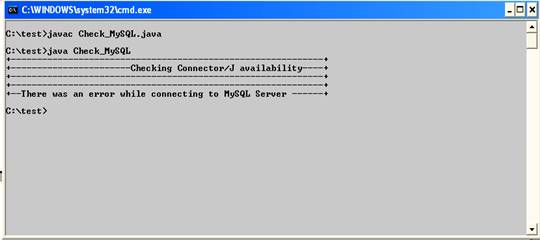
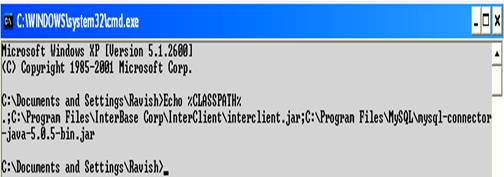
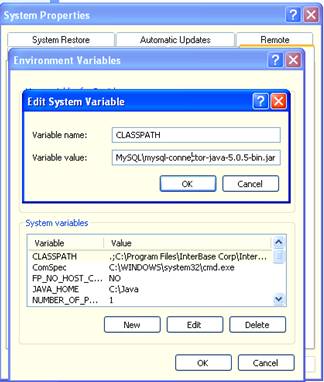
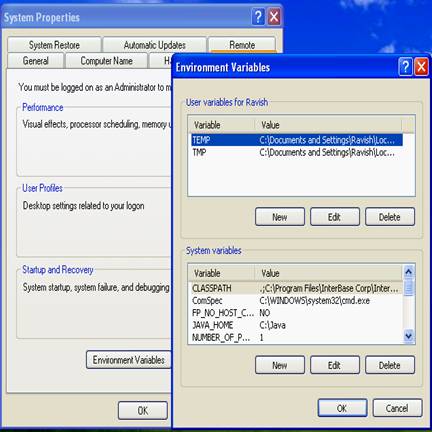
.;mysql_connector_J_path\mysql-connector-java-5.0.5-bin.jar Check_MySQL
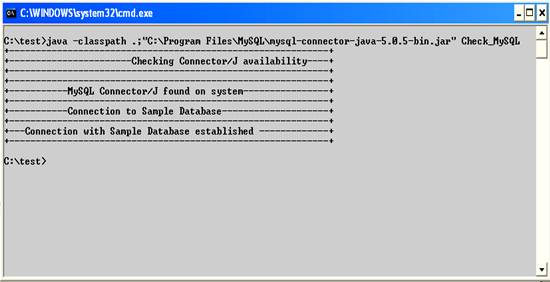
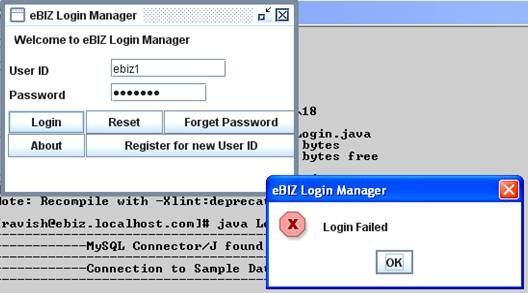
The sample program given below demonstrates how you retrieve data into your Java application from a MySQL table. Sample below shows how you can perform custom actions depending upon the query results.
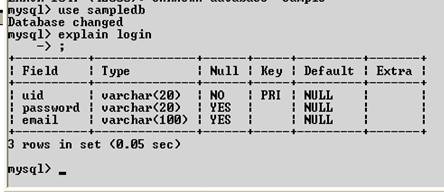
create database sampledb;
use database sampledb;
create table login
(
uid varchar(20) not null,
password varchar(15) not null,
email varchar (75),
Primary Key (uid)
);
import javax.swing.*;
/**
*
*@author: xyz.#xyz@ebizel.com
*
*/
public class Login extends javax.swing.JFrame
{
	/**
	*Variable declaration
	*/
	private javax.swing.JLabel l1,l2,l3;
	private javax.swing.JTextField uidFld;
	private javax.swing.JPasswordField pass;
	private javax.swing.JButton
         loginB,resetB,forgotB,abtB,signupB;
	private static java.sql.Connection con;
	private java.sql.ResultSet rs;
	private java.sql.PreparedStatement pst;
	private javax.swing.JPanel p1;
	static	java.io.PrintStream
        out=java.lang.System.out;

	 /**
	 *Connection details
	 */
	static String  db="sampledb",
         dbUser="root",dbPass="sa",
         dbURL="jdbc:mysql://localhost",
         dbDriver="com.mysql.jdbc.Driver";
static int dbPort=3306;
	public Login()
	{
		super("eBIZ Login Manager");
		javax.swing.JFrame.setDefaultLook
                 AndFeelDecorated(true);
 		try
		{
		Class.forName(Login.dbDriver).newInstance();
		Thread.sleep(500);

	out.println("+----------------------------+");
	out.println("+----------------------------+");
	out.println("+----------------------------+");
	out.println("+----------------------------+");
	out.println("+----------------------------+");

	con=java.sql.DriverManager.
        getConnection
       (dbURL+":"+String.valueOf(dbPort)
        +"/"+db,dbUser,dbPass);

			Thread.sleep(300);

		}
		catch (Exception e)
		{
			out.println(e);
		}

		initComp();
		this.setResizable(false);
		this.setDefaultCloseOperation
(javax.swing.WindowConstants.DO_NOTHING_ON_CLOSE);
		this.setSize(310,210);
		this.show(true);
		this.setLocation(100,200);
		this.addWindowListener(new java.awt.event.WindowAdapter()
		{
			public void windowClosing(java.awt.event.WindowEvent we)
			{
int
r=javax.swing.JOptionPane.showConfirmDialog

(new javax.swing.JFrame(),"Are you sure

you want to exit Login manager [Y/N]","eBIZ Login
Manager",javax.swing.JOptionPane.YES_NO_OPTION);

	if (r==javax.swing.JOptionPane.YES_OPTION)
					System.exit(0);
				else
					return;
			}
		}
		);

	}
	private void initComp()
	{
javax.swing.JFrame.setDefaultLookAndFeelDecorated(true);

		p1=new javax.swing.JPanel ();
		getContentPane().add(p1);
		p1.setLayout(null);


		l1=new javax.swing.JLabel

("Welcome to eBIZ Login Manager");
		l1.setBounds(10,2,230,25);
		p1.add(l1);

		l2=new javax.swing.JLabel("User ID");
		l2.setBounds(5,35,100,25);
		p1.add(l2);

		uidFld=new javax.swing.JTextField();
		uidFld.setBounds(110,35,120,20);
		p1.add(uidFld);

		l3=new javax.swing.JLabel("Password");
		l3.setBounds(5,61,100,25);
		p1.add(l3);

		pass=new javax.swing.JPasswordField();
		pass.setBounds(110,61,100,20);
		p1.add(pass);
loginB=new javax.swing.JButton("Login");
loginB.setBounds(3,90,80,25);
loginB.setCursor
(new java.awt.Cursor(java.awt.Cursor.HAND_CURSOR));
	p1.add(loginB);
loginB.addActionListener(new java.awt.event.ActionListener()
		{
	public void actionPerformed(java.awt.event.ActionEvent ae)
			{
			int result=doLogin(uidFld.getText(),pass.getText());
		if (result==1)
javax.swing.JOptionPane.showMessageDialog
(new javax.swing.JFrame(),
"Login Sucess","eBIZ Login Manager",
javax.swing.JOptionPane.INFORMATION_MESSAGE);
				else
javax.swing.JOptionPane.showMessageDialog
(new javax.swing.JFrame(),
"Login Failed","eBIZ Login Manager",
javax.swing.JOptionPane.ERROR_MESSAGE);

			}
		}
		);

		resetB=new javax.swing.JButton("Reset");
		resetB.setBounds(84,90,80,25);
		p1.add(resetB);
		resetB.addActionListener
(new java.awt.event.ActionListener()
			{
				public void actionPerformed
(java.awt.event.ActionEvent ae)
				{
					uidFld.setText("");
					pass.setText("");
				}
			}
			);
	forgotB=new javax.swing.JButton("Forget Password");
forgotB.setBounds(165,90,140,25);
p1.add(forgotB);

abtB=new javax.swing.JButton("About");
abtB.setBounds(3,115,80,25);
p1.add(abtB);

abtB.addActionListener(new java.awt.event.ActionListener()
{
public void actionPerformed(java.awt.event.ActionEvent ae)
{
showAbout();
	}
	}
);

signupB=new javax.swing.JButton("Register for new User ID");
signupB.setBounds(84,115,221,25);
p1.add(signupB);


}
public int doLogin(String id,String pass)
{
final String id1=id,pass1=pass;
int result=0;
try
{
Class.forName(Login.dbDriver).newInstance();
con=java.sql.DriverManager.getConnection
(dbURL+":"+String.valueOf(dbPort)+"/"+db,dbUser,dbPass);
pst=con.prepareStatement
("select * from login where uid=? and password=?");
			pst.setString(1,id);
			pst.setString(2,pass);
			rs=pst.executeQuery();
			if (rs.next())
			{
				result= 1;
	}
			else
				result=0;

			return result;
		}
		catch (Exception e)
		{
			out.println(e);return 0;
		}

	}
private void showAbout()
	{
javax.swing.JOptionPane.showMessageDialog(this,"
eBIZ Login Manager
Developed by : xyzi","About Login Manager",
javax.swing.JOptionPane.INFORMATION_MESSAGE);
}
public static void main(String[] args)
	{
javax.swing.JFrame.setDefaultLookAndFeelDecorated(true);

			Login l=new Login();
	}
}
 |
 |
 |