| Introduction |
| |
| Description of Application Window |
| |
| You create and manipulate your documents and files using various elements such as panels, bars, and windows. Any arrangement of these elements is called a workspace. When you first start an Adobe Creative Suite component, you see the default workspace, which you can customize for the tasks you perform there. For instance, you can create one workspace for editing and another for viewing, save them, and switch between them as you work. |
| |
 |
| |
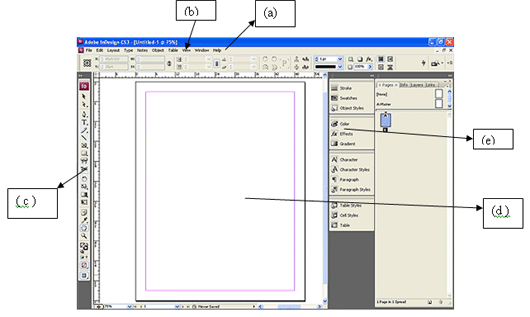
| (a) Menu bar (b) Control panel (c) Toolbox (d) Document Window (e) Docker window |
| |
• The menu bar across the top organizes commands under menus.
• The Tools box contains tools for creating and editing images, artwork, page elements, and so on. Related tools are grouped together.
• The Control panel displays options for the currently selected tool.
• The Document window displays the file you’re working on.
• Dockers help you monitor and modify your work. |
| |
|
| |


