• Width: You can select desired width from the given list.
• Height: You can select desired height from the given list.
• Number: Number of columns required in document.
• Gutter: Gutter ie the space between two facing pages.
 |
 |
| Introduction | ||
| Getting started | ||
| Adobe Indesign software is very useful for all designers especially for designers of publishing industry. Adobe Indesign software we can say a combination of illustrator, pagemaker and photoshop. A designer can do all his designing job in one software. In Adobe Indesign one can create vector images, can do jobs related to book work ie page composing, page layout setting etc. You can apply various effects on bitmap images or JPEG images as in Photoshop. In Adobe Indesign you can also create Web Interactive buttons as like in Dreamweaver. | ||
| Starting of Adobe Indesign Application | ||
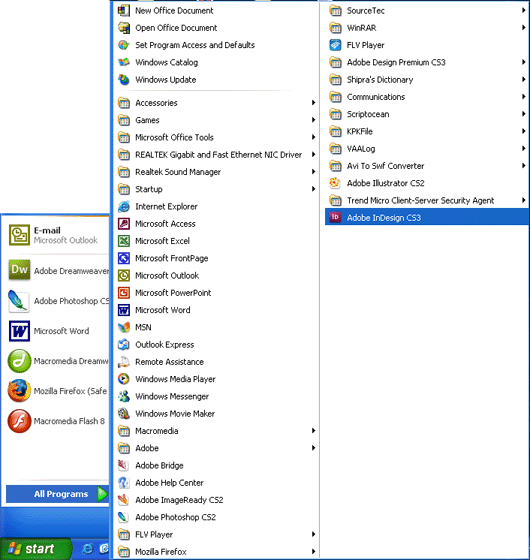
| To get start Indesign Application: | ||
| Click Start>Programs> Adobe Indesign | ||
|
||
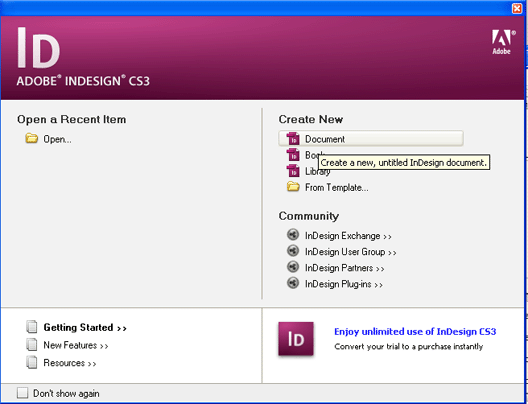
| A window will appear on the screen as shown below: | ||
|
||
| To create new document click on Create New Document button right on the top of window otherwise click on Open folder icon on left of window as shown above. | ||
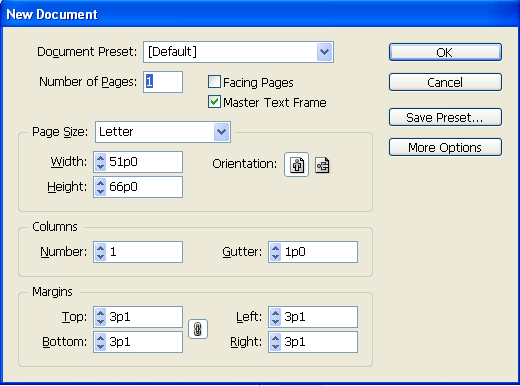
| After clicking on Create New Document a dialog box will appear on the screen as shown in figure below: | ||
|
||
| Do change or adjust the list boxes in the New Document dialog box. | ||
| Document Present: means the document with default page size ie letter size or the custom size ie legal, A4, A6 paper size of document. | ||
| Page Size: You can select any page size ie A4, letter, legal etc from the list given. • Width: You can select desired width from the given list. • Height: You can select desired height from the given list. |
||
| Columns • Number: Number of columns required in document. • Gutter: Gutter ie the space between two facing pages. |
||
| Margins: For the space on the top, bottom, left and right of the page. | ||
| After adjusting values click on OK button to start working with the new document. | ||
|
||