| Physical Identification |
| |
| Key Board |
| |
 |
| |
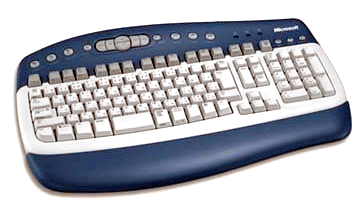
| It is a device to enter the information into computer. |
| |
| Information is entered by pressing its key, when required just like a typewriter but with negligible sound. |
| |
| 104/105 keys keyboard have become popular as standard witch can be categorised as under: |
| |
| Numeric pad (0-9, +, -, /, Del, Enter) |
| |
| Function keys (F1...F12) |
| |
| Alphanumeric pad: ( A - Z, 0-9, mathematical symbols) |
| |
| Special key (Esc, Ctrl, Alt) |
| |
| Micro Scroll keys ( Left, Right, Up, Down arrow keys.) |
| |
| Macro scroll keys ( Home, End, Page up, Page down.) |
| |
| Apart from key as mentioned above, keyboard also has 3 status LEDs captioned Num Lock, Caps lock & Scroll lock. |
| |
| Keys Function F1 - F12 |
| |
| Use to perform special function depending upon software being used. |
| |
| Enter |
| |
| Used to communicate the end of data being keyed in through the keyboard Caps Locl Used to capitalized alphabets. |
| |
| Shift Caps Lock off |
| |
| It captalised alphabets. |
| |
| Caps-lock on |
| |
| It reverse the above effect. |
| |
| Also used to input upper symbols for keys with two symbols on them. |
| |
| Ctrl, Alt |
| |
| Pressed with other keys to input special message to the computer. |
| |
| Backspace |
| |
| Used to erase character to the left of cursor position. |
| |
| Numlock |
| |
| Used to activate the numeric keys on the numeric keypad. |
| |
| Cursor keys |
| |
| Used to move cursor in the direction indicated. |
| |
| Home, end, pg up, pg down |
| |
| Used to move cursor at the beginning of line, at the end of line. Pg up & pg down key used to see the text printed page- wise scrolling them up & down on the screen. |
| |
| Insert |
| |
| Used to insert characters at the current cursor position. |
| |
| Del |
| |
| Used to delete the characters at the current cursor position. |
| |
| Esc |
| |
| Generally used to return to previous menu or to cancel the command. |
| |
| Scroll lock |
| |
| Used to activate/deactivate the scrolling of text on the screen. |
| |
| Print Screen |
| |
| Used to print whatever is displayed on the screen. |
| |
| Pause |
| |
| Used to give pause to application running on the screen. |
| |
| |
|
| |
| |


