| Physical Identification |
| |
| Monitor |
| |
| Monitor is just like a TV set, where you can see the information. Like a TV set monitors are available with black and white (monochrome) as well as color display. |
| |
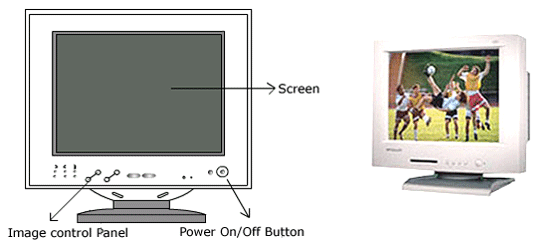
| Front view of the Monitor. |
| |
 |
| |
| As you can see the size of screen of monitor are standard 15, 19, 21 inches monitor. |
| |
| Basically it is length of diagonal of monitor. Each dot in the monitor called the pixel. Bigger the monitor - more quantity of pixel better the quality of display. |
| |
| In the bottom of the display there are some button to set the display. |
| |
| Some standard buttons are "Power on/off" to switch on the power of the monitor, power indicator light indicate the operating status of the display. |
| |
| There are other buttons to adjust the quality of the display are "Contrast of display" to increase /decrease the display contrast. Brightness to adjust brightness of the screen. |
| |
| There are buttons to adjust the size of the display are: |
| |
| Horizontal size to adjust image width. Horizontal position to adjust picture image left & right. |
| |
| Vertical size button to adjust image height. Vertical position button to adjust picture image up & down. |
| |
| Picture pincushion button to correct bowing in and out of the image. Geometric distortion setting button. |
| |
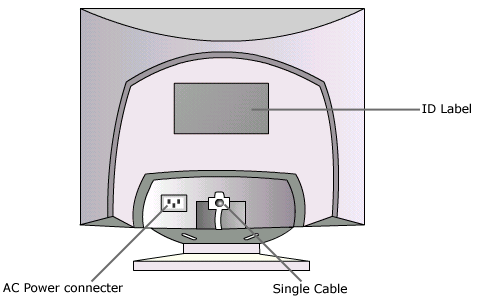
| Rear view of monitor. |
| |
 |
| |
| There are two points called AC power connector point to get the monitor power of 220 V & signal cable point to get digital video signal from CPU BOX. |
| |
| |
|
| |
| |


