| Physical Identification |
| |
| C. P. U. |
| |
| Let us go through the physical identification of each part of a computer system. |
| |
| MOTHER BOARD is one important part of computer system, which executes the whole task of the operator. |
| |
| As you can easily understand that Mother board consist of CPU, RAM, ROM, FDD, HDD, CD-ROM, installed in a metallic box or mainframe called chassis, which can be in the form of Tower. |
| |
| Front view. |
| |
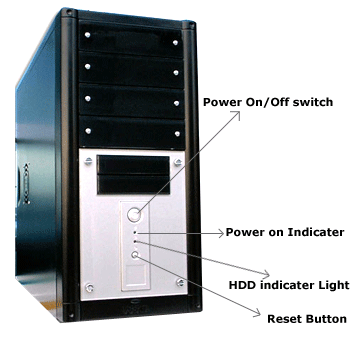
| As you can clearly observe that in a standard CPU box there are: |
| |
 |
| |
| Storage bays to insert the Hard Disk Drive, Floppy Disk Drive, CDROM, which are external memory of the computer to store the information. |
| |
| Power on/off switch provides power supply to the computer. |
| |
| Power on indicator to indicate the power status of the computer. |
| |
| HDD indicator light: When it blinks that mean system is approaching (accessing) HDD to execute task like read, write, save etc. |
| |
| LAN LED indicator: If system has internal Modem. |
| |
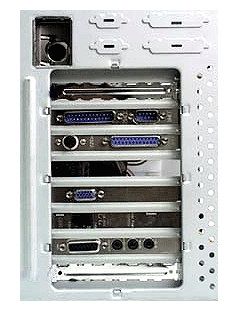
| Let us go to the rear view of mother board. |
| |
 |
| |
| It is clear that CPU box is a master to execute all tasks either give display or print information or enjoy music or see movie. |
| |
| To execute the entire task it obviously requires accessories attached to the Motherboard at the rear (back) side of Motherboard i.e. |
| |
| Monitor to see the edit information. |
| |
| Speakers like Sound blaster to hear music. |
| |
| Printer to print information. |
| |
| Joystick to play games in computer. |
| |
| Keyboard to feed information. |
| |
| Amplifier to amplify the music signal. |
| |
| CD player to give music. |
| |
| Facilitation the connection of devices with motherboard, chassis of motherboard equipped with various PORTS just like socket of electricity to get power. |
| |
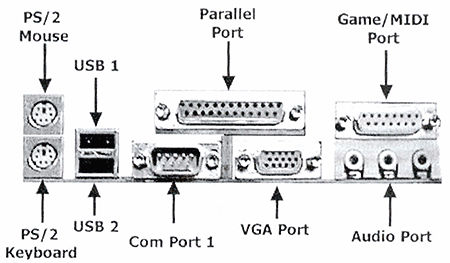
| So, to understand interconnectivity of Motherboard with accessories, we should understand the application of each port & connector. |
| |
 |
| |
| Ports are designed "D" shaped, so term D-port often use to name them. |
| |
| If the message is given through one wire they called serial port, if message given using more than one wire the port called parallel port. |
| |
| Parallel ports are faster than serial port. Serial ports are significant, where the speed of transfer of message does not play an important roll for example mouse & keyboard port. |
| |
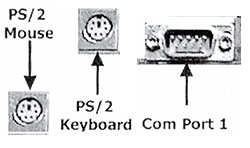
| PS/2 or D-Port for mouse & Keyboard. |
| |
 |
| |
| These are D-type 9 or 25 pin ports called COM ports and round ports called PS/2 ports. |
| |
| 9 pin ports are specified for connecting mouse & keyboard. While 25 pin connectors are for connecting MODEM. |
| |
| Some chassis are equipped with PS/2 port, which is circular port & work in the same principle. To get connection we have to bus PS/2 keyboard & mouse. |
| |
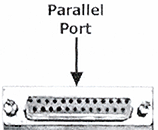
| D-Port for printer (LPT1). |
| |
 |
| |
| There are two row 25 pin ( 13 +12) female ports specified for printer cable. |
| |
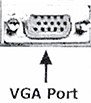
| D-Port for display. |
| |
 |
| |
| There is 3-row 15 (5+5+5) pin female port for connecting signal cable of display monitor
Other then above there are two D- sub three pin connector to give power supply to CPU box as well as monitor. |
| |
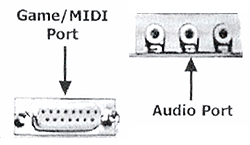
| If your computer is equipped with MULTIMEDIA i.e. if your computer works as a music CD-player to enjoy music or VCD player to see movie, then four additional ports attached to motherboard. |
| |
 |
| |
| Line in port to get sound signal from cassette player, CD-player etc. |
| |
| Line out port to get sound signal to be amplified connected to amplifier.
Sound port to connect two speakers. |
| |
| 2- row of 15 pins (8+7) D-type joystick port to connect joystick for playing. |
| |
| |
|
| |
| |


