| Advance Features in excel 2007 |
| |
| Insert Hyperlinks in Excel |
| |
| You can place Hyperlinks in the cells on your spreadsheet. To quickly go to a different worksheet or workbook, you would simply click the link. We'll see how to do that now. |
| |
.	Click inside of cell A1 of a new spreadsheet
.	From the Excel 2007 menu bar, click the Insert menu
.	From the Insert menu, locate the Links panel
.	Click on Hyperlink:
|
| |
 |
| |
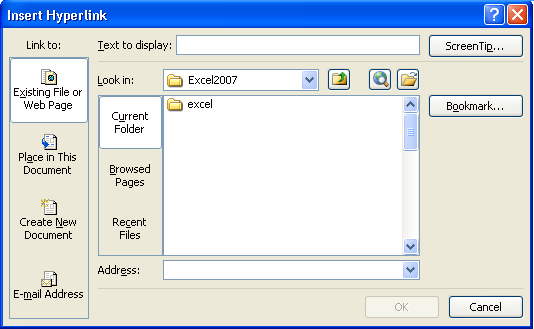
| When you click the Hyperlink item, you'll see the following dialogue box appear: |
| |
 |
| |
| We're going to create a link to another worksheet in this same spreadsheet. So, under Link to on the left, click on "Place in This Document". |
| |
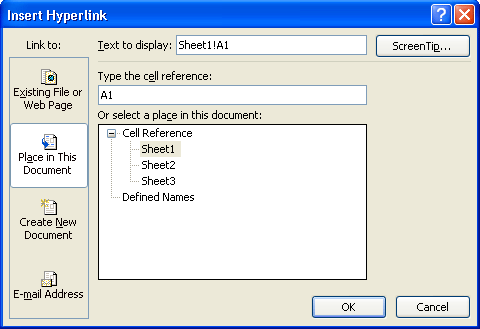
| When you click Place in This Document, the dialogue box changes to this: |
| |
 |
| |
| We'll try linking to Sheet3 on our spreadsheet. When the link is clicked on Sheet1, we want to jump to a specific cell on Sheet3. |
| |
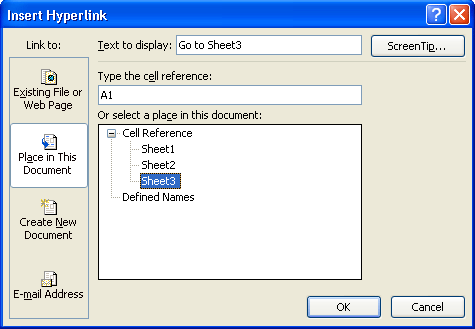
. Under "Or select a place in this document, click on Sheet3
. Type some text in the Text to display box at the top. This is the text of your hyperlink, as it will display in the cell
. Click the Screen Tip button at the top, and type some text for when the mouse is over the link |
| |
| Your dialogue box will then look something like this one: |
| |
 |
| |
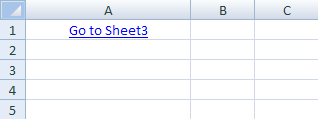
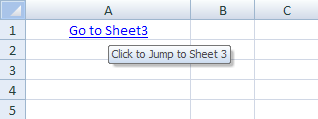
| Click OK when you're done, and you'll see cell A1 on your spreadsheet change: |
| |
 |
| |
| Hold your mouse over the link and you should see your Screen Tip: |
| |
 |
| |
| Try to click on your link, and you might find that nothing happens! To use the hyperlink, you have to click the link and hold your mouse down for a second or so. Let go of the left mouse button and you should jump to Sheet 3. |
| |
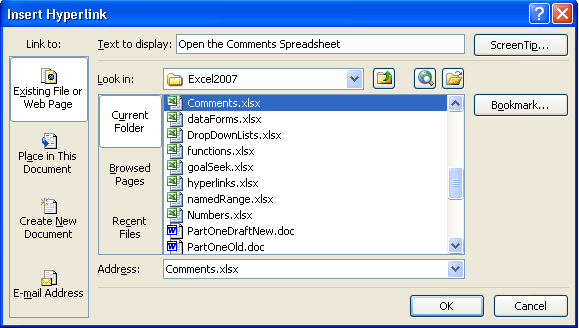
| If you want to open up an existing spreadsheet, instead of jumping to a location in the current one, click the Hyperlink item on the Links panel to bring up the dialogue box again. |
| |
 |
| |
.	Under Link to on the left, select Existing File or Web Page
.	Navigate to the location of your spreadsheet from the Look in area
.	Select the spreadsheet to open
.	Type some text, and a Screen tip
.	Then click OK
|
| |
| When you click your new link, the spreadsheet file you selected will open. |
| |
| For Animated Presentaiton Click Here! |
| |
|
| |
| |


