| To activate DOS from Windows we will need the following steps: |
| 1) Locate the MS-DOS icon on the Desktop. |
| 2) Now move the mouse-pointer over the MS-DOS icon present on the Desktop and double click the left mouse button. Instantly, the DOS screen along with a prompt(C:\>) is displayed. |
| Or we can do it like these ways: |
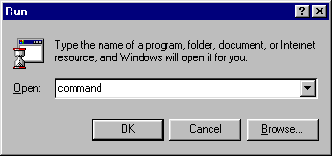
| 1. Let's open an MS-DOS Prompt window. To do that, click on the "Start" menu (at the lower left of our screen) and select "Run...". Then we type "command" (no quotation marks) into the box and click "OK". |
 |
| 2. We should see an MS-DOS Prompt window appear. |
| 3. We tell the MS-DOS Prompt window what we want to do by typing commands rather than using our mouse. The MS-DOS Prompt window understands the commands. At the end of each command, press the Enter key. To get help on a particular command, add " /?" to the end of the command, such as: "dir /?". |
| Ex: |
| Here we see the help of command ver. We are using the VER/? And press the Enter |


