| Elements of C++ Language |
| |
| Data Types |
| |
| Data can be of many type e.g. character, integer, real, string etc. Any thing enclosed in single quotes represent character data. |
| |
| Data type are means to identify the type of data and associated operation of handling it. |
| |
| C++ data types are of two types: |
| |
| Fundamental Data type |
| Derived Data Type |
| |
| Fundamental Data type |
| |
| Integer (int): |
| |
| An integer can contain only digits (numbers) from 0 to 9. Examples of integers are: |
| |
| 0 |
| 10 |
| 345 |
| 6789 |
| -23 |
| -600 |
| |
| It includes positive and negative numbers but the numbers have to be whole numbers. |
| |
| It does accept the decimal point. Hence the following numbers are not integer data types: |
| |
| 3.5 |
| 4.8 |
| 0.23 |
| |
| These numbers come under the second category (floating point type) and not under integers. |
| |
| How to declare a variable as belonging to the type integer? The syntax is: |
| |
| int variable-name; |
| |
| In C++ ‘qualifiers’ can be used to vary the range of fundamental data types. |
| |
| Qualifiers are only supplements to the basic data types and they cannot be used separately on their own. |
| |
| They work only with a basic (or fundamental) data type. |
| |
| The 4 qualifiers available in C++ are: |
| |
| shot |
| long |
| signed |
| unsigned |
| |
| When an integer is specified as signed, then automatically the most significant bit of the number is used as a sign bit (to denote the sign of the number). |
| |
| Hence it can be used if the programmer needs positive and negative number values for the variable. |
| |
| By declaring a variable as an integer, by default you can specify both positive and negative values. By default an integer is a signed integer. In other words, |
| |
| int variable-name; |
| |
| is the same as |
| |
| signed int variable-name; |
| |
| In the second form, ‘signed’ is the qualifier and it is used to explicitly state that the variable is a signed integer. |
| |
| For an unsigned integer the syntax will be: |
| |
| unsigned int variable-name; |
| |
| An unsigned integer can hold a value up to 65,535 (a signed integer can hold only up to 32,767). |
| |
| Of course, in an unsigned integer you cannot assign a negative value. |
| |
| The range is from 0 to 65,535. To go beyond 65,535 and make use of both positive and negative values as well, the qualifier long should be used. |
| |
| long int variable-name; |
| |
| Long integers occupy 4 bytes of memory (32 bits). |
| |
| Remember, long int actually means signed long int (you can give positive and negative values). |
| |
| If you specify |
| |
| unsigned long int variable-name; |
| |
| you can only assign positive values to the variable. Thus, two qualifiers can be used together with a basic data type. |
| |
| What about the ‘short’ qualifier? |
| |
| Short integer is the same as a signed integer. It occupies two bytes and has the same range of positive and negative values as the normal integer case. |
| |
| int x; |
| |
| is usually same as |
| |
| short int x; |
| |
| Compilers (depending on the operating system) will assume ‘int’ as a ‘long int’ or a ‘short int’. |
| |
| Turbo C++ (which is a DOS based compiler) will default to ‘short int’ when you specify a variable as type ‘int’. |
| |
| Programmers sometimes prefer to explicitly state what type of integer they want to use by making use of the ‘short’ and ‘long’ qualifiers. |
| |
| ‘short int’ always occupies only 2 bytes (irrespective of whether the OS is Windows or DOS) while a ‘long int’ always occupies 4 bytes. |
| |
| Floating Types (float): |
| |
| Floating type data include integers as well as numbers with a decimal point. It can also have an exponent. Exponent means 10 to the power of some integer value (whole number). 20000 = 2 x 10^4 = 2e4 = 2E4. |
| |
| If you specify decimal numbers, floating point data type will store up to a precision of 6 digits after the decimal point. |
| |
| Suppose 0.1234567 is assigned to a floating-point variable, the actual value stored would be 0.123457 (it will round up to the sixth digit after the decimal place). Valid floating-point numbers are: |
| |
| 0.1276 |
| 1.23 |
| 1.0 |
| 10.2 |
| 2e5(this will be typed in your code as 2e5) |
| |
| Do not use an exponent with a decimal point. |
| |
| For example: 2e2.2 is an invalid floating point because the exponent has to be an integer. |
| |
| Floating point numbers use 4 bytes of memory and has a much greater range than integers because of the use of exponents. |
| |
| They can have values up to 10^38 (in positive and negative direction). The same qualifiers used for an integer can be applied to floating point numbers as well. |
| |
| To declare a floating variable, the syntax is: |
| |
| float variable-name; |
| Character (char): |
| |
| A character uses just one byte of memory. It can store any character present on the keyboard (includes alphabets and numbers). It can take numbers from 0 to 9 only. The following are valid characters: |
| |
| A |
| B |
| 3 |
| a |
| : |
| , |
| / |
| |
| If the number 13 is entered as the value for a character, the program will only store 1 (i.e it will store the first character that it encounters and will discard the rest). |
| |
| A character is stored in one byte (as a binary number). Thus whatever the user enters is converted into a binary number using some character set to perform this conversion. |
| |
| Mostly all computers make use of the ASCII (American Standard Code for Information Interchange). For example, according to the ASCII coding, the letter ‘A’ has a decimal value of 65 and the letter ‘a’ has a value of 97. |
| |
| The syntax to declare a variable which can hold a character is: |
| |
| char variable-name; |
| |
| Double (double): |
| |
| This is similar to the floating-point data type but it has an even greater range extending up to 10308. |
| |
| The syntax to declare a variable of type double is: |
| |
| double variable-name; |
| |
| Boolean Type (bool): |
| |
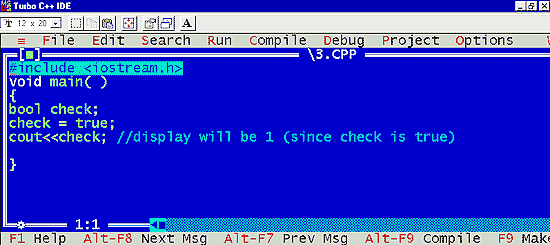
| This data type will only accept two values: true or false. In C++, ‘true’ and ‘false’ are keywords. |
| |
| Actually a value of true corresponds to 1 (or a non-zero value) and a value of false corresponds to 0. |
| |
 |
| |
| Remember: |
| |
| The size of data types given above is a general case. Data type sizes depend on the operating system. So it may vary from system to system. |
| |
| Name |
| Bytes* |
| Description |
| Range* |
| char |
| 1 |
| |
| character or integer 8 bits length. |
| |
| signed: -128 to 127 |
| unsigned: 0 to 255 |
| shot |
| 2 |
| integer 16 bits length. |
| signed: -32768 to 32767 |
| unsigned: 0 to 65535 |
| long |
| 4 |
| integer 32 bits length. |
| signed:-2147483648 to 2147483647 |
| unsigned: 0 to 4294967295 |
| int |
| * |
| |
| Its length traditionally depends on the length of the system's Word type, thus in MSDOS it is 16 bits long, whereas in 32 bit systems (like Windows 9x/2000/NT and systems that work under protected mode in x86 systems) it is 32 bits long (4 bytes). |
| |
| See short, long |
| float |
| 4 |
| floating point number. |
| 3.4e + / - 38 (7 digits) |
| double4 |
| 8 |
| double precision floating point number. |
| 1.7e + / - 308 (15 digits) |
| long double |
| 10 |
| long double precision floating point number. |
| 1.2e + / - 4932 (19 digits) |
| bool |
| 1 |
| |
| Boolean value. |
| |
| It can take one of two values: true or false |
| |
| Note: this is a type recently added by the ANSI-C++ standard. Not all compilers support it. |
| true or false |
| |
| Derived Data Type |
| |
| From the fundamental type other types can be derived by using the declaration operators. Some of the derived data types are: |
| |
| Arrays |
| |
| Array refers to the named list of finite number n of similar data elements Each of the data elements can be referenced respectively by a set of consecutive numbers, usually 0,1, 2, .... n. |
| |
| Array can be one dimensional, two dimensional or multi dimensional. |
| |
| Syntax: int a[10]; |
| int b[10][10]; |
| |
| Function |
| |
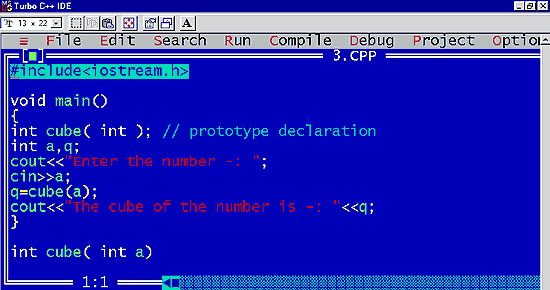
| A function is a named party of the program that can be invoked from other parts of the program as often needed. |
| |
| Program |
| |
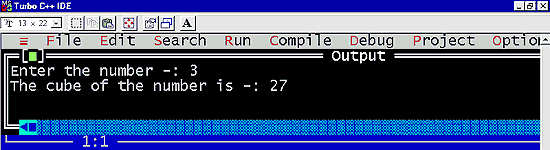
| Using a function to accept a number and return the cube of the number: |
| |
 |
| |
| Out put of the program |
| |
 |
| |
| |
|
| |
| |


