| . Is part of the java.io package. You will need an import statement to access the class with its abbreviated name. |
| . Is an extension of the Object class |
 |
| . Encapsulates platform-independent information about a file or a directory. |
| While all platforms use pathname strings to name files and directories, they do not agree on the format of these strings. For example, the Windows pathname string is not the same as the Unix pathname string. |
| Regardless of platform, however, all pathnames have two components: |
| 1. An optional system-dependent prefix string (such as the disk-drive specifier followed by "/" for the Unix root directory or "" for the Windows root directory) |
| 2. A sequence of zero or more string names where each name, except for the last, denotes a directory. The the last name may denote either a directory or a file. A system-dependent separator ("/" for Unix or "" for Windows) is used between each name. |
| For example, |
| The following represents a valid Windows pathname: |
| C:My DocumentsNew CoursesLesson55.php |
| Regardless of the platform, the File class presents a system-independent view of pathnames. |
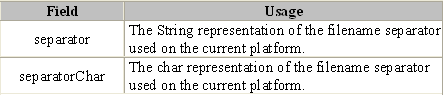
| . Has a number of static fields. These two are the most useful: |
 |
public class AppFile
{
public static void main(String[] args)
{
if (File.separator.equals(""))
System.out.println("Windows");
else
System.out.println("Not Windows");
}
}
| Output |
| NOTE: |
| Constructing a File object does NOT create a disk file. It only constructs a platform-independent object for referencing the file. |
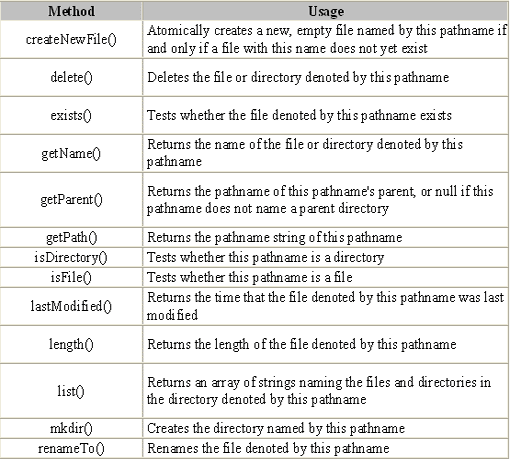
| . Has a number of methods, some of which WILL create, rename, and delete a disk file or a directory. They should obviously be used with caution. The most frequently used methods are: |
 |
| Consult the Java API documentation for more details. |
 |
 |
 |