| . Is part of the java.io package |
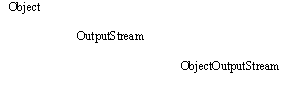
| . Is an extension of the OutputStream class, an abstract class that describes the behavior of an output stream |
 |
| . Is a high-level class that can be used to send primitive values and "serializable" objects to a stream. All that is needed for an object to be serializable, is that its class must implement the Serializable interface. For example, if a Customer class is to be serializable, its header may be coded |
| public class Customer implements Serializable |
| The interface requires no methods. |
| Many packaged classes are serializable including all wrapper classes, String and Stringbuffer classes, Vector and Array classes, and the collection classes. In other words, an entire collection, such as a SortedMap, can be stored as an object on disk! |
| . Has overloaded constructors but the most useful "chains" to an object that descends from the OutputStream class (such as a FileOutputStream object). For example, if fd is the reference of a File object |
| ObjectOutputStream out = new ObjectOutputStream(new FileOutputStream(fd)); |
| It will construct a ObjectOutputStream object chained to a FileOutputStream object for sending primitive values and serializable objects to the file. Because a checked, IOException may occur, the statement should be enclosed in a try block with an appropriate catch. |
| . Has many useful methods as follows: |
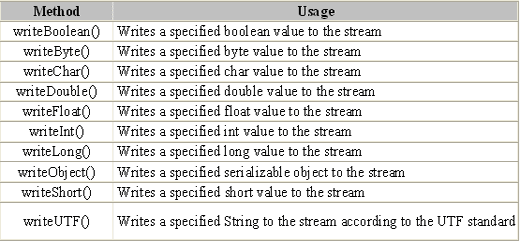 |
| Because a checked, IOException may occur, calls to these methods should be enclosed in a try block with an appropriate catch. Consult the Java API documentation for more details. |
| . Example. The following program can be used to create a file of multiple array objects on disk. |
| import java.io.*; public class App { public static void main(String[] args) { // Local variables and object references. char again = 'y'; String[] array; File fd; ObjectOutputStream out; // Get the path name from the user. System.out.print("Enter the file's complete path name: "); fd = new File(Keyboard.readString()); // Try to write data to the output stream. try { // Open an output stream for the file. out = new ObjectOutputStream(new FileOutputStream(fd)); // This loop constructs an array with values entered by the user // and writes the array to the file. The user is given the option // of repeating the loop to construct and store another array. while (again == 'Y' || again == 'y') { System.out.print("How many strings will you enter? "); array = new String[Keyboard.readInt()]; for (int i = 0; i < array.length; i++) { System.out.print("Enter a string: "); array[i] = Keyboard.readString(); } out.writeObject(array); System.out.print("Again? (Y/N) "); again = Keyboard.readChar(); } // Close the stream. out.close(); System.out.println("Closed - " + fd.getPath()); } // Catch an IOException if one is thrown. catch (IOException e) { System.out.println(e.getMessage()); } } } |
 |
 |
 |