| Managing Input/Output Files in Java |
| |
| The DataInputStream class |
| |
| . Is part of the java.io package |
| |
| . Is an extension of the FilterInputStream class (a superclass
that facilitates the chaining of high-level and low-level input streams) |
| |
| . Is a high-level class that can be used to read primitive
values and UTF ("Unicode Transformation Format") strings from a stream |
| |
| . Has a single constructor that "chains" to an object
that descends from the InputStream class (such as a FileInputStream object).
For example, if fd is the reference of a File object |
| DataInputStream in = new DataInputStream(new FileInputStream(fd)); |
| |
| It will construct a DataInputStream object chained to
a FileInputStream object for reading primitive values and
UTF strings from the file. Because a checked, IOException
may occur, the statement should be enclosed in a try block
with an appropriate catch. |
| |
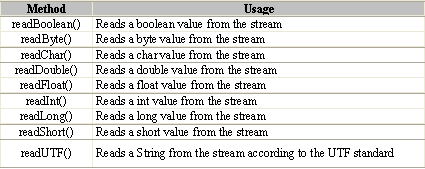
| . Has many useful methods as follows: |
| |
|
| |
| Because a checked, IOException may occur, calls to these
methods should be enclosed in a try block with an appropriate catch.
Consult the Java API documentation for more details. |
| |
| . Example. The following program can be used to read
a file of double values from disk. It can be used to display
the values stored by the previous sample program. |
| |
import java.io.*;
public class App
{
public static void main(String[] args)
{
// Local variables and object references.
File fd;
DataInputStream in;
// Get the path name from the user.
System.out.print("Enter the file's complete path name: ");
fd = new File(Keyboard.readString());
// Try to read data from the input stream.
try {
// Open an input stream for the file.
in = new DataInputStream(new FileInputStream(fd));
// This loop reads a double value from the stream and displays
// it. The loop ends when end of file is reached.
try
{
while (true)
{
System.out.println(in.readDouble());
}
}
catch (EOFException e)
{
System.out.println("");
}
// Close the stream.
in.close();
System.out.println("Closed - " + fd.getPath());
}
// Catch an IOException if one is thrown.
catch (IOException e)
{
System.out.println(e.getMessage());
}
}
} |
| |
| |
|
|
| |
| |