| Effects on objects |
| |
| Creating Blending Effect |
| |
| Blending effect creates very attractive drawings in coreldraw. Blending is done by interactive blend tool. |
| |
| Blending with Interactive Blend Tool. |
 |
|
| |
| . Click the Interactive blend tool. |
| |
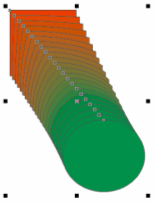
| . Select the first object, and drag over the second object. |
| |
| Figure below showing straight line blend |
| |
 |
| |
| . If you want to decrease or increase the number of steps and direction of blend go to the property bar and specify the number of blending steps and angle of blending direction. |
| |
 |
| |
| To change the blend path |
| |
| . Select a blend. |
| |
| • Click the Path properties button |
 |
|
| |
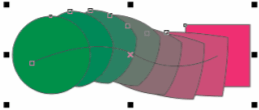
| . Click the path you want to use for the blend. |
| |
 |
| |
| Figure showing blend on path. |
| |
| To detach blend from path |
| |
| . Click the Path properties button |
|
|
| |
| To Remove blend |
| |
| . Click on blend objects. |
| |
| . Click on Clear blend button |
 |
|
| |
| Note: You can also remove a selected blend by clicking Effects >Clear blend. |
| |
| |
|
| |


