| Introduction to C |
| |
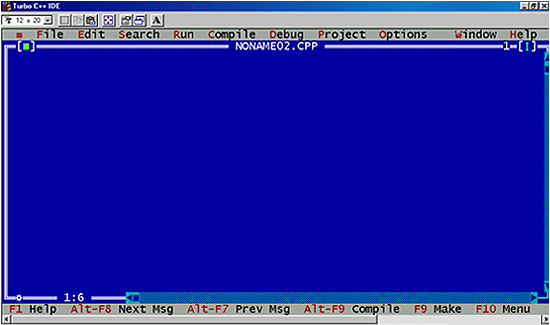
| Description of C code window |
| |
 |
| |
| 1. =: Interface to external programs. |
| |
| 2. File: File related option such as opening and saving file. |
| |
| 3. Edit: Cut,Copy,Paste operation. |
| |
| 4. Search: Find,Find & Replace operation. |
| |
| 5. Run: Compile and run the file currently loaded in the text editor. And debugging such as setting/clearing trace points can be performed from this menu. |
| |
| 6. Compile: The menu item compiles a source file to an object file or an .exe file. |
| |
| 7. Debug: Provides interactive debugging. Variables can be examined/set/cleared, and we can watch variables change during execution. |
| |
| 8. Project: This menu item controls Borland C++'s handling of large programs that are in multiple source file. |
| |
| 9. Option: Default option are set during installation . The user can change any option at any time through this menu. |
| |
| 10. Windows: Windows operation include zoom, arranging windows on the screen , and closing windows. |
| |
| 11. Help: Borland C++ includes a context sensitive help capability. Select Help or press f1 for general Help, Shift f1 for indexed help or Ctrl f1 for context sensitive help. |
| |
| |
|
| |
| |


